Your YouTube thumbnail is often the first thing viewers notice. Even the best video can struggle to attract views if its thumbnail doesn’t capture attention. A strong thumbnail encourages viewers to click, improves your video’s click-through rate (CTR), and helps your content compete in crowded search results and recommendations.
By combining ChatGPT with Adobe Express, you can quickly create professional YouTube thumbnails without starting from a blank canvas. ChatGPT helps generate creative concepts, headlines, and visual ideas, while Adobe Express transforms those ideas into editable thumbnail designs.
In this guide, you’ll learn how to create YouTube thumbnails using AI, from the initial concept to the finished design.
Why Use ChatGPT and Adobe Express?
Creating YouTube thumbnails manually often requires:
- Brainstorming thumbnail ideas
- Writing short headlines
- Choosing colors
- Selecting images
- Designing layouts
- Testing multiple versions
With ChatGPT and Adobe Express, much of this work becomes conversational.
Instead of spending hours experimenting, you simply describe the style you want.
Step 1: Define Your Video
Before creating your thumbnail, identify what your video is about.
Examples include:
- Product reviews
- Tutorials
- Travel vlogs
- Gaming videos
- Technology news
- Business tips
- Cooking recipes
- Fitness coaching
- Educational lessons
- AI demonstrations
Knowing your topic helps AI generate more relevant designs.
Step 2: Describe Your Thumbnail
Open ChatGPT and explain what you want.
Example prompt:
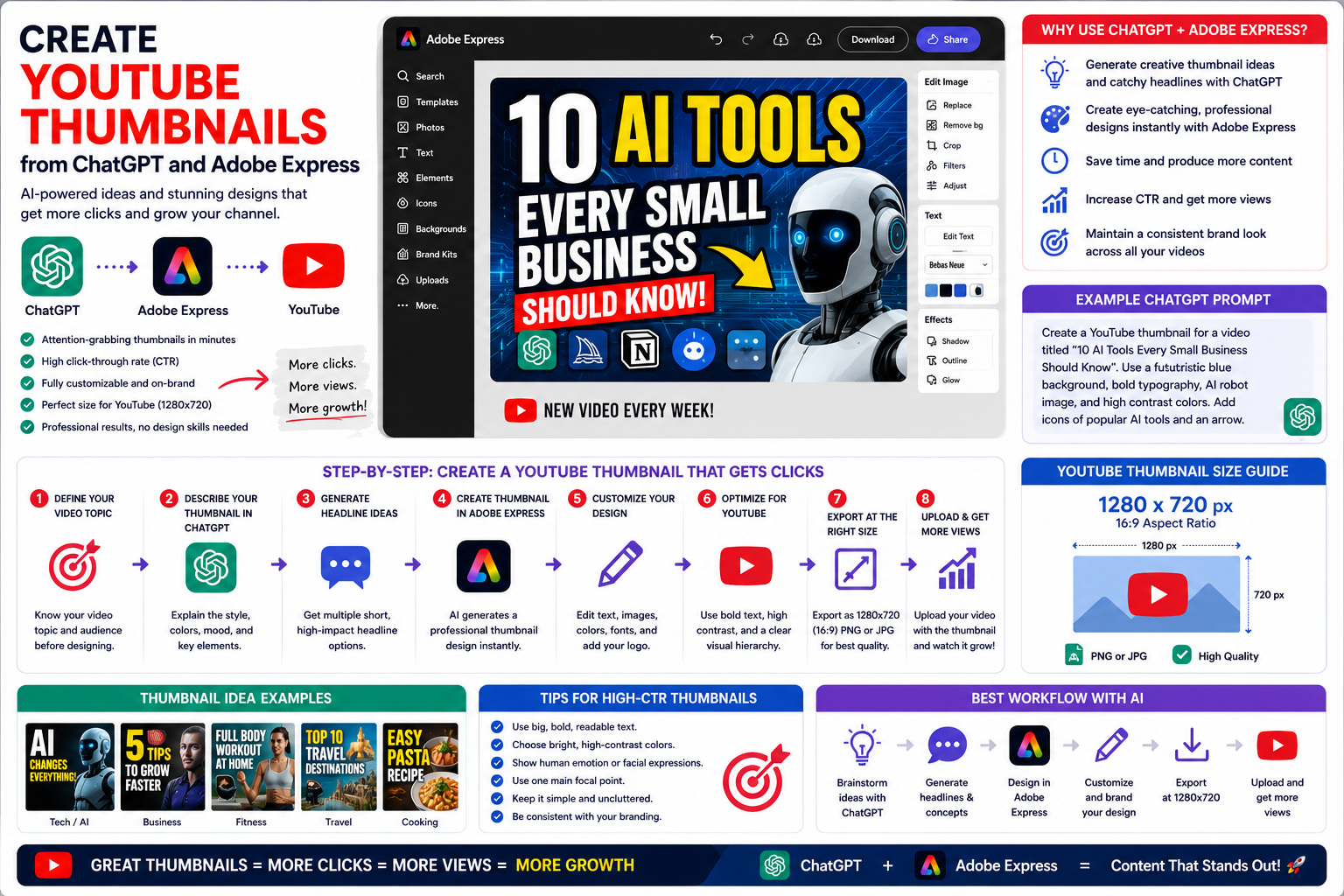
Create a YouTube thumbnail for a video called “10 AI Tools Every Small Business Should Know.” Use bright blue colors, modern typography, AI-themed graphics, and an energetic YouTube style.
Or:
Design a YouTube thumbnail for a Photoshop tutorial using bold text, vibrant colors, and a split before-and-after image.
Specific prompts almost always produce better results.
Step 3: Generate Thumbnail Headlines
ChatGPT can generate multiple headline ideas.
Ask something like:
Give me ten YouTube thumbnail headlines under four words for a video about AI automation.
Possible results might include:
- AI Changed Everything
- Work Smarter Today
- Save Hours Daily
- Don’t Miss This
- AI Secrets Revealed
Short headlines are easier to read on mobile devices.
Step 4: Generate the Thumbnail
Adobe Express creates the initial design.
The AI typically generates:
- Bold typography
- High-contrast colors
- Strong focal image
- Background graphics
- Visual effects
- Space for branding
This becomes your starting point for customization.
Step 5: Customize in Adobe Express
Open the project inside Adobe Express.
You can now:
- Replace images
- Upload your own photo
- Add your logo
- Change fonts
- Modify colors
- Add icons
- Apply your Brand Kit
- Adjust spacing
Many creators also increase contrast and sharpen key visual elements to make the thumbnail stand out.
Step 6: Optimize for YouTube
A YouTube thumbnail should remain readable even on small mobile screens.
Best practices include:
- Large headline
- High contrast
- One central subject
- Bright colors
- Minimal text
- Clear facial expressions (if appropriate)
- Strong visual hierarchy
Avoid cluttering the design with too many elements.
Step 7: Export the Thumbnail
When you’re satisfied with the design:
- Export as PNG or JPG.
- Verify image quality.
- Upload it when publishing your YouTube video.
Adobe Express preserves high image quality while keeping the process simple.
Recommended Thumbnail Size
YouTube recommends:
1280 × 720 pixels
Additional recommendations:
- 16:9 aspect ratio
- High-resolution image
- File size under YouTube’s upload limit
- PNG or JPG format
Adobe Express makes it easy to create thumbnails using these dimensions.
Example Prompt Library
Technology
Design a YouTube thumbnail for a video explaining AI agents using futuristic blue colors and bold typography.
Tutorial
Create a Photoshop tutorial thumbnail with a dramatic before-and-after comparison and large yellow text reading “Amazing Results!”
Fitness
Design a motivational workout thumbnail using energetic colors and the headline “30-Day Challenge.”
Business
Create a thumbnail for a business growth video with professional blue branding and the title “Double Your Sales.”
Travel
Design a travel vlog thumbnail featuring tropical beaches, vibrant colors, and the headline “Hidden Paradise.”
Tips for Better YouTube Thumbnails
Successful thumbnails usually include:
- Large readable text
- Bright colors
- One primary subject
- High-quality photography
- Strong contrast
- Emotional expressions (where appropriate)
- Consistent branding
Simple, bold designs often perform better than complex layouts.
Common Mistakes
Avoid prompts like:
Create a YouTube thumbnail.
Instead write:
Design a YouTube thumbnail for a video titled “How to Build an AI Agent in Python.” Use a dark background, glowing blue AI graphics, modern typography, Python branding, and a bold headline reading “Build AI Agents.”
The additional context helps Adobe Express generate a more effective design.
Best Workflow
Many YouTube creators follow this workflow:
- Brainstorm thumbnail ideas with ChatGPT.
- Generate several short headlines.
- Create the thumbnail in Adobe Express.
- Replace placeholder images with your own.
- Apply consistent branding.
- Export at YouTube dimensions.
- Upload when publishing your video.
Many creators also design two or three thumbnail variations and test which version performs best.
Who Should Use This Workflow?
This AI-assisted workflow is valuable for:
- YouTubers
- Educators
- Course creators
- Gaming channels
- Technology reviewers
- Business coaches
- Travel creators
- DIY channels
- Marketing agencies
- Small businesses
Anyone producing YouTube content can reduce design time while maintaining professional quality.
Conclusion
Creating YouTube thumbnails with ChatGPT and Adobe Express combines AI-powered creativity with easy-to-use design tools. ChatGPT helps you develop engaging concepts and short, attention-grabbing headlines, while Adobe Express transforms those ideas into polished thumbnails that remain fully editable.
Whether you’re launching a new YouTube channel or publishing videos every week, this workflow helps you produce professional thumbnails faster, maintain a consistent visual style, and improve the chances of attracting more viewers.
Frequently Asked Questions
What size should a YouTube thumbnail be?
YouTube recommends 1280 × 720 pixels with a 16:9 aspect ratio.
Can ChatGPT write thumbnail headlines?
Yes. ChatGPT can generate multiple short headline ideas, helping you test different approaches.
Can I use my own photos?
Absolutely. Adobe Express allows you to upload your own images and replace the AI-generated placeholders.
Should I create multiple thumbnail versions?
Yes. Many successful YouTube creators test different thumbnail designs to improve click-through rates and overall video performance.
Related Articles
- Build Pinterest Pins with ChatGPT and Adobe Express
- Design Facebook Ads with ChatGPT and Adobe Express
- Generate an Instagram Post with ChatGPT and Adobe Express
- Best ChatGPT Prompts for Adobe Express
- How to Create Your First Social Media Graphic with ChatGPT and Adobe Express