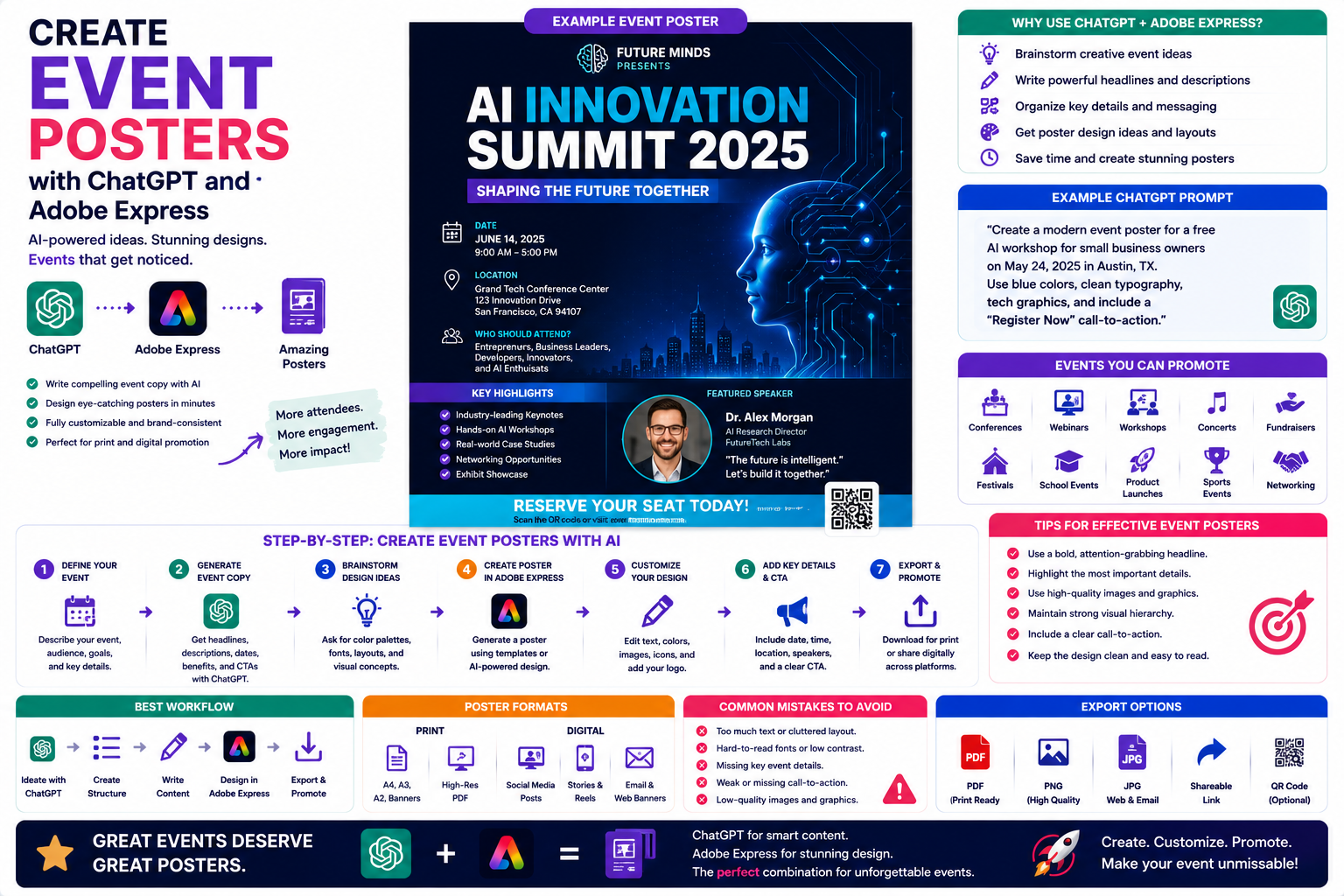
Whether you’re organizing a business conference, charity fundraiser, live concert, workshop, school event, or community festival, a well-designed poster is one of the fastest ways to attract attention and encourage people to attend.
Creating an effective event poster requires much more than attractive graphics. It also needs a compelling headline, clear event details, strong visual hierarchy, and a persuasive call to action.
By combining ChatGPT with Adobe Express, you can generate professional event posters in a fraction of the time required by traditional design methods. ChatGPT helps develop creative ideas and write persuasive content, while Adobe Express transforms those ideas into polished, editable poster designs.
In this guide, you’ll learn how to create event posters from concept to completion using AI.
Why Use ChatGPT and Adobe Express?
Traditional poster design often involves:
- Brainstorming ideas
- Writing event copy
- Choosing colors
- Selecting fonts
- Designing layouts
- Finding images
- Balancing text and visuals
With ChatGPT and Adobe Express, much of this work becomes conversational.
Instead of beginning with a blank poster, you begin with a clear creative concept.
What Events Can You Promote?
This workflow is suitable for almost every type of event.
Examples include:
- Business conferences
- Webinars
- Workshops
- Product launches
- Charity fundraisers
- Concerts
- School events
- Sporting competitions
- Community festivals
- Restaurant promotions
- Open houses
- Networking events
The same process can be adapted to nearly any audience or industry.
Step 1: Define Your Event
Start by explaining your event to ChatGPT.
Example:
Create a modern event poster promoting a free AI workshop for small business owners. Use professional blue branding, clean typography, and include a “Register Now” call-to-action.
Or:
Design a colorful music festival poster using bold typography, vibrant gradients, and energetic styling.
The more detail you provide, the better the design concept will be.
Step 2: Generate the Event Copy
ChatGPT can write nearly every piece of text needed for your poster.
Examples include:
- Event title
- Subtitle
- Date and time
- Venue
- Speaker information
- Key benefits
- Registration instructions
- Calls to action
- Short promotional descriptions
Example prompt:
Write compelling event copy for a cybersecurity seminar aimed at IT managers.
Having multiple versions lets you choose the strongest message.
Step 3: Create the Poster Design
Once the copy is ready, Adobe Express generates an initial poster.
The design may include:
- Professional typography
- Eye-catching layout
- Color palette
- Decorative graphics
- Image placeholders
- Call-to-action buttons
- Space for logos and sponsors
Think of this as a professionally designed first draft.
Step 4: Customize the Poster
Open the project inside Adobe Express.
Now personalize the design by:
- Uploading your logo
- Adding sponsor logos
- Replacing stock photos
- Changing fonts
- Adjusting colors
- Adding icons
- Applying your Brand Kit
- Repositioning elements
This ensures your event branding remains consistent.
Step 5: Add Important Information
Every successful event poster should clearly answer:
- What is the event?
- When does it happen?
- Where is it held?
- Who should attend?
- Why should they attend?
- How do they register?
Place this information where it is easy to scan.
Step 6: Include a Call-to-Action
Your poster should encourage immediate action.
Examples include:
- Register Now
- Buy Tickets
- Reserve Your Seat
- Join Us
- Learn More
- Scan the QR Code
- Visit Our Website
A clear call-to-action helps improve response rates.
Step 7: Optimize for Print and Digital
Adobe Express allows you to create posters for different uses.
- A4
- A3
- Large-format posters
- Event banners
Digital
- Instagram posts
- Facebook posts
- LinkedIn graphics
- Digital signage
- Website banners
- Email promotions
One design can often be resized for multiple platforms.
Example Prompt Library
Business Conference
Design a professional conference poster promoting an AI innovation summit using blue gradients, clean typography, and modern technology illustrations.
Charity Event
Create a fundraising poster for a local animal shelter using warm colors, friendly typography, and pet photography.
Music Festival
Design a vibrant summer music festival poster featuring colorful gradients, large typography, and energetic graphics.
Restaurant Promotion
Create an event poster advertising a wine tasting evening with elegant black and gold styling and premium food photography.
School Event
Design a science fair poster using bright educational illustrations and family-friendly colors.
Tips for Better Event Posters
Professional posters usually include:
- One strong headline
- High-quality imagery
- Large readable text
- Clear event details
- Consistent branding
- Plenty of white space
- One clear call-to-action
Avoid overcrowding the design with unnecessary information.
Common Mistakes
Avoid prompts such as:
Create an event poster.
Instead write:
Design an A3 event poster promoting a free cybersecurity conference for IT professionals. Use a blue and black technology theme, modern typography, include keynote speaker information, event location, registration QR code placeholder, and a bold “Reserve Your Seat Today” call-to-action.
Specific prompts consistently produce better results.
Best Workflow
Many event organizers follow this workflow:
- Brainstorm event ideas with ChatGPT.
- Generate headlines and event copy.
- Create the poster in Adobe Express.
- Apply branding.
- Add sponsor logos and images.
- Create print and digital versions.
- Export for marketing.
This workflow dramatically reduces design time while maintaining a professional appearance.
Who Should Use This Workflow?
This approach is ideal for:
- Event planners
- Marketing agencies
- Schools
- Universities
- Non-profit organizations
- Restaurants
- Conference organizers
- Community groups
- Churches
- Small businesses
Anyone promoting an event can benefit from AI-assisted content creation and design.
Why This Workflow Is Effective
Starting with ChatGPT allows you to focus on your event’s message before moving into visual design.
By the time you open Adobe Express, you’ll already have:
- A creative direction
- Event messaging
- Headlines
- Calls to action
- Layout ideas
This results in faster design work and fewer revisions.
Conclusion
Creating event posters with ChatGPT and Adobe Express combines intelligent content generation with professional design tools. ChatGPT helps you write persuasive event copy and organize key information, while Adobe Express transforms those ideas into attractive, editable posters suitable for both print and digital promotion.
Whether you’re advertising a conference, workshop, fundraiser, or community event, this AI-powered workflow helps you create high-quality promotional materials quickly while maintaining consistent branding and a polished appearance.
Frequently Asked Questions
Can ChatGPT write event poster text?
Yes. ChatGPT can generate headlines, event descriptions, speaker introductions, calls to action, schedules, and promotional messaging.
Can Adobe Express create event posters?
Yes. Adobe Express offers templates and design tools that make it easy to create posters for business, educational, entertainment, and community events.
Can I add sponsor logos and QR codes?
Absolutely. Adobe Express allows you to insert logos, graphics, images, and QR codes to provide additional information or registration links.
Can I print my event poster?
Yes. Adobe Express supports high-resolution exports suitable for professional printing as well as digital formats for online promotion.
Related Articles
- Generate Marketing Brochures with ChatGPT and Adobe Express
- Design a Flyer Without Opening Adobe Express
- Make Presentation Slides with ChatGPT and Adobe Express
- Design Facebook Ads with ChatGPT and Adobe Express
- Best ChatGPT Prompts for Adobe Express