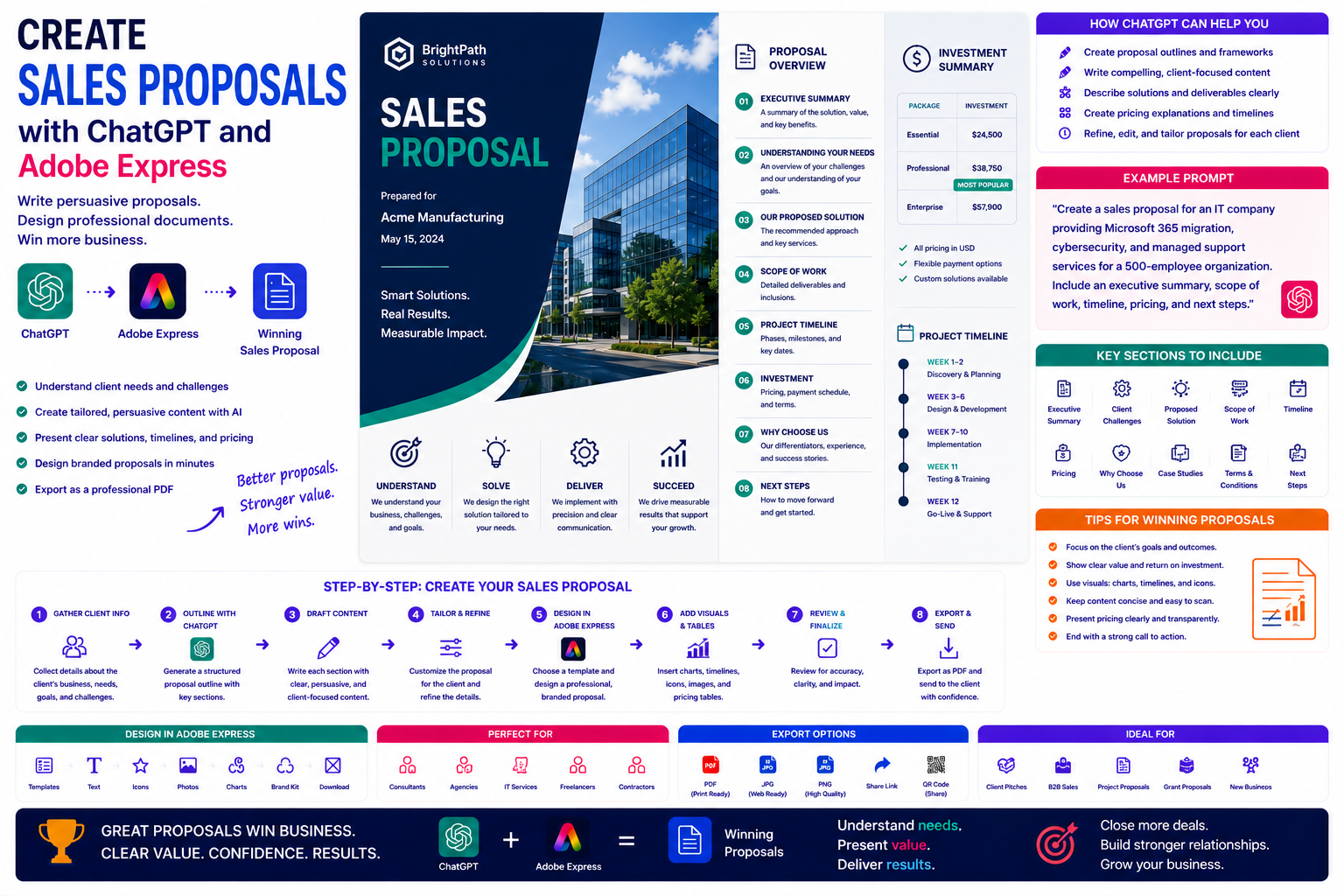
A sales proposal is often the deciding factor between winning and losing a new customer. A well-written proposal demonstrates that you understand the client’s challenges, presents a clear solution, explains the value of your services, and gives prospects confidence in your ability to deliver.
Unfortunately, creating proposals from scratch can consume hours of valuable time. Every proposal requires research, writing, pricing, formatting, branding, and careful review.
By combining ChatGPT with Adobe Express, you can significantly accelerate this process. ChatGPT helps organize your ideas, generate persuasive content, and tailor proposals to each client, while Adobe Express transforms that information into professional documents that reinforce your brand.
In this guide, you’ll learn how to create winning sales proposals using AI.
Why Use ChatGPT and Adobe Express?
Preparing a proposal traditionally involves:
- Understanding client requirements
- Writing executive summaries
- Describing your solution
- Creating project timelines
- Presenting pricing
- Designing layouts
- Applying company branding
- Exporting professional PDFs
With ChatGPT and Adobe Express, much of this work becomes faster while maintaining a high level of quality.
What Makes a Great Sales Proposal?
An effective proposal focuses on the client’s needs—not your company.
Most successful proposals include:
- Executive summary
- Understanding of the client’s challenges
- Proposed solution
- Scope of work
- Timeline
- Pricing
- Why choose your company
- Next steps
This structure makes it easy for decision-makers to evaluate your offer.
Who Can Use This Workflow?
This workflow works well for:
- Consultants
- Marketing agencies
- IT service providers
- Designers
- Software companies
- Construction firms
- Freelancers
- Financial advisors
- Legal firms
- Business consultants
Any business that sends client proposals can benefit from AI-assisted writing and design.
Step 1: Understand the Client
Begin by gathering information about the prospective customer.
Include:
- Industry
- Business goals
- Current challenges
- Desired outcomes
- Budget expectations
- Timeline
- Decision makers
The more context you provide, the more personalized your proposal will become.
Step 2: Generate a Proposal Outline
Ask ChatGPT to build a proposal structure.
Example prompt:
Create a professional proposal outline for an IT consultancy offering Microsoft 365 migration and cybersecurity services to a manufacturing company.
Typical sections include:
- Cover Page
- Executive Summary
- Client Challenges
- Proposed Solution
- Scope of Services
- Project Timeline
- Investment
- About Our Company
- Next Steps
A clear structure improves readability and professionalism.
Step 3: Write Each Section
ChatGPT can draft:
- Executive summaries
- Project overviews
- Service descriptions
- Deliverables
- Project methodologies
- Benefits
- Risk mitigation
- Closing statements
Review the content carefully to ensure it accurately reflects your services and commitments.
Step 4: Tailor the Proposal
One of ChatGPT’s greatest strengths is personalization.
Example prompt:
Rewrite this proposal specifically for a healthcare organization concerned about data privacy and regulatory compliance.
Tailored proposals show prospects that you understand their business rather than sending generic templates.
Step 5: Present Pricing Clearly
ChatGPT can help explain pricing in a professional manner.
Include:
- Project phases
- Deliverables
- Optional services
- Support packages
- Payment schedule
- Terms and conditions
Clear pricing reduces confusion during negotiations.
Step 6: Design the Proposal in Adobe Express
Once your content is ready, open Adobe Express.
Choose a clean business document template.
Adobe Express helps you design:
- Professional cover pages
- Section dividers
- Pricing tables
- Timeline pages
- Team introductions
- Closing pages
A polished design reinforces the quality of your services.
Step 7: Add Visual Elements
Adobe Express allows you to strengthen your proposal with:
- Process diagrams
- Project timelines
- Team photographs
- Service icons
- Customer logos
- Infographics
- Charts
- Before-and-after illustrations
Visuals make complex information easier to understand.
Step 8: Apply Company Branding
Maintain consistency throughout the proposal.
Include:
- Company logo
- Corporate colors
- Brand fonts
- Contact information
- Professional imagery
- Consistent headers and footers
Strong branding increases trust and recognition.
Step 9: Export and Send
Sales proposals are commonly shared as:
- PDF attachments
- Download links
- Client portals
- Presentation handouts
- Printed documents
- Proposal websites
Adobe Express supports high-quality PDF exports suitable for every professional setting.
Example Prompt Library
IT Consulting
Create a sales proposal for a Microsoft Azure migration project including security improvements, user training, and ongoing managed services.
Marketing Agency
Write a proposal offering SEO, content marketing, social media management, and monthly reporting for a growing e-commerce business.
Graphic Design
Create a proposal for a complete corporate rebranding project including logo design, brand guidelines, website graphics, and marketing materials.
Construction
Develop a proposal outlining office renovation services, project phases, budget estimates, and construction timelines.
Software Development
Write a proposal for building a custom CRM system including discovery, development, testing, deployment, and maintenance.
Tips for Better Sales Proposals
Professional proposals usually:
- Focus on client outcomes.
- Explain the business value.
- Use concise language.
- Include visuals.
- Present pricing clearly.
- Highlight previous successes.
- End with a clear call to action.
Decision-makers should immediately understand the value you provide.
Common Mistakes
Avoid prompts such as:
Write a sales proposal.
Instead write:
Create a professional proposal for a cybersecurity consultancy helping a 750-employee manufacturing company achieve ISO 27001 certification. Include an executive summary, current security challenges, proposed implementation roadmap, project timeline, pricing options, expected business outcomes, and next steps. Use a confident executive tone.
Specific prompts consistently produce stronger proposal drafts.
Best Workflow
Many successful sales teams follow this workflow:
- Gather client information.
- Generate a proposal outline with ChatGPT.
- Draft each section.
- Personalize the content.
- Design the proposal in Adobe Express.
- Add branding and visuals.
- Review pricing and timelines.
- Export as a professional PDF.
- Deliver to the client.
This structured process helps produce high-quality proposals while reducing preparation time.
Why This Workflow Works
ChatGPT organizes your proposal before you begin designing.
By the time you open Adobe Express, you’ll already have:
- A personalized executive summary
- A structured project plan
- Clear pricing explanations
- Strong value propositions
- A professional narrative
Adobe Express then transforms that information into a polished proposal that reflects the quality of your business.
Conclusion
Creating sales proposals with ChatGPT and Adobe Express combines AI-assisted writing with professional document design. ChatGPT helps personalize proposals, explain complex solutions, and communicate value clearly, while Adobe Express provides modern layouts, branding tools, and visual elements that create a polished, client-ready presentation.
Whether you’re pitching consulting services, software development, marketing campaigns, or professional services, this AI-powered workflow helps you produce persuasive proposals more efficiently while maintaining a consistent and professional brand image.
Frequently Asked Questions
Can ChatGPT write a complete sales proposal?
Yes. ChatGPT can help generate proposal outlines, executive summaries, solution descriptions, pricing explanations, and project timelines. Always review the proposal to ensure it accurately reflects your services, pricing, and commitments.
Can Adobe Express design professional proposals?
Yes. Adobe Express provides document templates and design tools that are suitable for business proposals, reports, presentations, and other client-facing documents.
Should every proposal be personalized?
Absolutely. Tailoring each proposal to the client’s goals, challenges, and industry demonstrates that you understand their needs and helps distinguish your proposal from generic competitors.
What is the best format for sending a proposal?
PDF is the preferred format because it preserves formatting across devices, is easy to share by email, and presents a professional appearance.
Related Articles
- Create Case Studies with ChatGPT and Adobe Express
- Create Annual Reports with ChatGPT and Adobe Express
- Create White Papers with ChatGPT and Adobe Express
- Create eBooks with ChatGPT and Adobe Express
- Best ChatGPT Prompts for Adobe Express