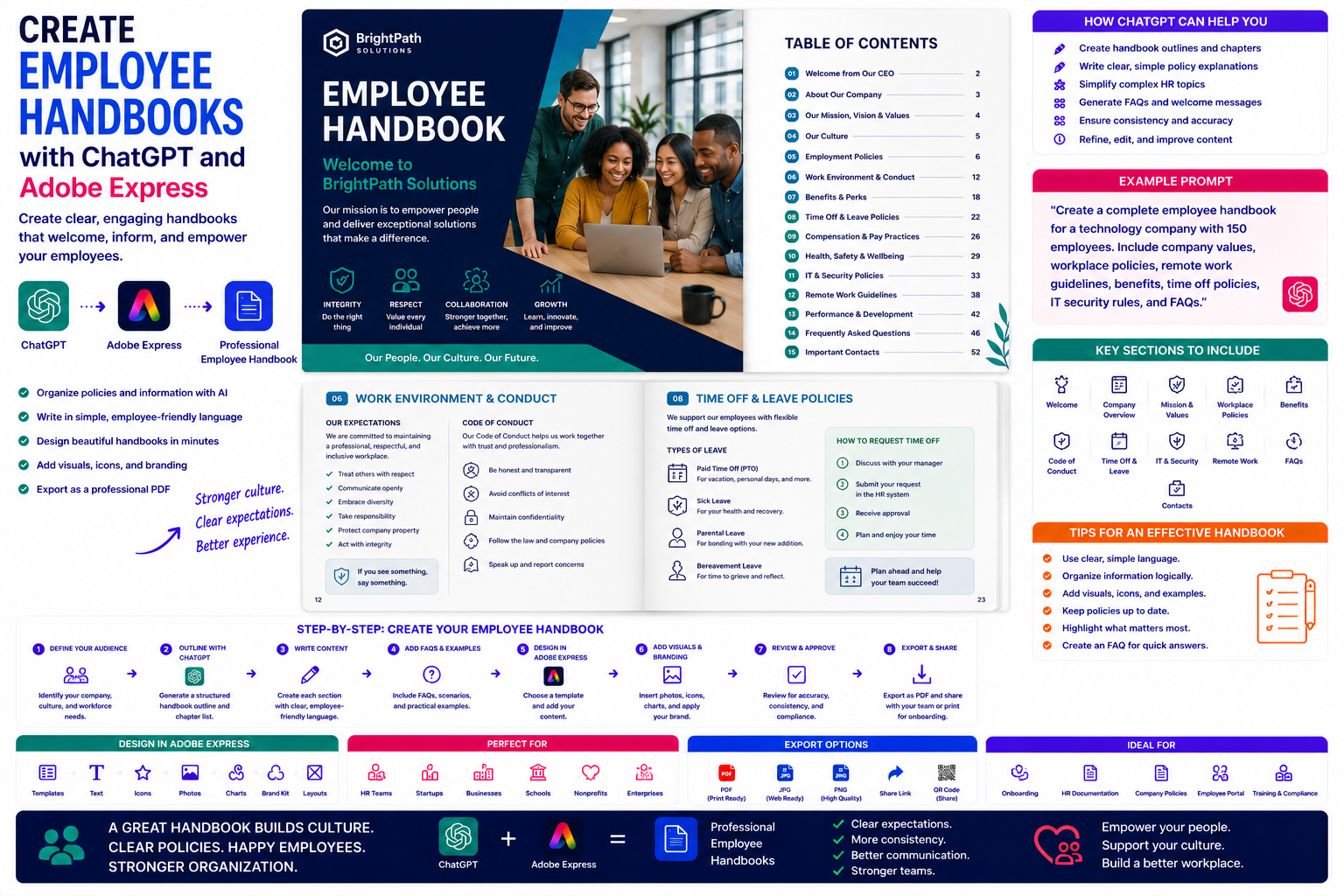
An employee handbook is often the very first document a new employee receives after joining an organization. It introduces your company’s mission, explains workplace expectations, documents important policies, and helps employees understand how the organization operates.
A clear handbook improves consistency, reduces misunderstandings, and answers many common questions before they become HR issues.
Traditionally, creating an employee handbook involves weeks of writing, editing, formatting, and reviewing. By combining ChatGPT with Adobe Express, much of this process becomes significantly faster while maintaining a professional appearance.
ChatGPT helps generate policies, organize chapters, simplify complex language, and create employee-friendly explanations, while Adobe Express transforms the content into an attractive handbook that reflects your company’s brand.
In this guide, you’ll learn how to build a professional employee handbook using AI.
Why Use ChatGPT and Adobe Express?
Creating an employee handbook usually requires:
- Collecting company policies
- Organizing chapters
- Writing employee-friendly explanations
- Designing layouts
- Adding visuals
- Applying branding
- Preparing digital and printed versions
Using ChatGPT and Adobe Express together makes the entire workflow much more efficient.
What Should an Employee Handbook Include?
Most employee handbooks contain:
- Welcome message
- Company history
- Mission and values
- Organizational structure
- Workplace policies
- Code of conduct
- Working hours
- Benefits
- Leave policies
- Health and safety
- IT security
- Remote work guidelines
- Contact information
The handbook should answer the questions that most new employees have during their first weeks.
Which Organizations Need Employee Handbooks?
Employee handbooks are useful for:
- Small businesses
- Startups
- Corporate organizations
- Government agencies
- Healthcare providers
- Schools
- Non-profit organizations
- Manufacturing companies
- IT organizations
- Retail businesses
Every growing organization benefits from documented expectations.
Step 1: Define Your Audience
Start by telling ChatGPT who the handbook is for.
Example prompt:
Create an employee handbook for a managed IT services company with approximately 150 employees working both remotely and in the office.
Or:
Write a handbook for a manufacturing company with production staff, warehouse employees, and office personnel.
This helps ChatGPT tailor the content to your workplace.
Step 2: Generate the Handbook Structure
Ask ChatGPT to organize the handbook.
Example prompt:
Create a professional employee handbook outline suitable for a modern technology company.
Typical chapters include:
- Welcome
- About the Company
- Company Values
- Employment Policies
- Workplace Conduct
- Benefits
- IT Policies
- Health & Safety
- Security
- Performance Reviews
- Professional Development
- Contact Information
A logical structure makes the handbook easier to navigate.
Step 3: Write Each Chapter
ChatGPT can draft:
- Welcome messages
- Company culture
- Workplace expectations
- Dress code
- Communication guidelines
- Attendance policies
- Security requirements
- Benefits summaries
Always review the content to ensure it accurately reflects your organization’s policies and complies with applicable employment laws.
Step 4: Simplify Policy Language
Policies often become easier to understand when written in plain language.
Example prompt:
Rewrite this vacation policy using simple language that new employees can easily understand.
ChatGPT helps improve readability while preserving the intent of the policy.
Step 5: Add Frequently Asked Questions
A FAQ section reduces repetitive HR questions.
Examples include:
- How do I request vacation?
- How do I report sickness?
- Who do I contact for IT support?
- How does expense reimbursement work?
- How do I update my personal information?
These answers provide employees with quick reference information.
Step 6: Design the Handbook in Adobe Express
Once your content is complete, open Adobe Express.
Create a professional handbook including:
- Cover page
- Table of contents
- Chapter dividers
- Policy pages
- FAQ section
- Contact pages
- Welcome page
Adobe Express helps maintain a consistent visual style throughout the handbook.
Step 7: Add Visual Elements
Visual content improves engagement.
Adobe Express allows you to add:
- Team photographs
- Office images
- Organization charts
- Icons
- Process diagrams
- Illustrations
- Callout boxes
- Section dividers
These elements make the handbook feel more welcoming and easier to navigate.
Step 8: Apply Company Branding
Customize the handbook with:
- Company logo
- Brand colors
- Corporate fonts
- Header styles
- Footer information
- Page numbering
- Consistent iconography
Brand consistency reinforces professionalism and company identity.
Step 9: Export and Distribute
Employee handbooks are commonly distributed as:
- PDF documents
- Employee portals
- SharePoint
- HR systems
- Learning management systems
- Printed booklets
Adobe Express produces high-quality PDFs suitable for both digital distribution and professional printing.
Example Prompt Library
Technology Company
Create an employee handbook for an IT company covering cybersecurity policies, Microsoft 365 usage, remote work, onboarding, and employee benefits.
Retail Business
Write a handbook explaining customer service standards, scheduling, attendance, workplace safety, and employee discounts.
Manufacturing
Create an employee handbook covering workplace safety, quality procedures, equipment usage, attendance, and reporting incidents.
Healthcare
Design a handbook explaining patient confidentiality, workplace conduct, infection control, and professional standards.
Startup
Create a modern employee handbook emphasizing company culture, flexible work, innovation, learning opportunities, and communication.
Tips for Better Employee Handbooks
Professional handbooks usually:
- Use clear language.
- Organize information logically.
- Include visual elements.
- Highlight important policies.
- Keep chapters concise.
- Provide contact information.
- Update content regularly.
Employees are more likely to read a handbook that is approachable and well designed.
Common Mistakes
Avoid prompts such as:
Write an employee handbook.
Instead write:
Create a complete employee handbook for a 250-person cybersecurity consulting company. Include company values, onboarding procedures, remote work guidelines, Microsoft 365 security policies, acceptable use policies, vacation procedures, employee benefits, learning opportunities, frequently asked questions, and emergency contacts. Use friendly but professional language suitable for new employees.
Detailed prompts consistently produce more useful handbook drafts.
Best Workflow
Many HR teams follow this process:
- Collect company policies.
- Generate the handbook outline with ChatGPT.
- Write each chapter individually.
- Simplify policy language.
- Add FAQs.
- Design the handbook in Adobe Express.
- Apply company branding.
- Export as PDF for onboarding.
This workflow helps organizations produce polished employee documentation while reducing the time needed to maintain it.
Who Should Use This Workflow?
This workflow is ideal for:
- HR departments
- Business owners
- Startup founders
- Operations managers
- Healthcare organizations
- Manufacturing companies
- Educational institutions
- Government agencies
- Non-profit organizations
- Growing businesses
Any organization hiring employees can benefit from AI-assisted handbook creation.
Why This Workflow Works
ChatGPT helps organize policies and explain them in clear language before you begin designing.
By the time you open Adobe Express, you’ll already have:
- A complete handbook structure
- Employee-friendly policy explanations
- FAQs
- Welcome messages
- Consistent chapter organization
Adobe Express then transforms that content into a professional handbook that is attractive, easy to navigate, and aligned with your company’s visual identity.
Conclusion
Creating employee handbooks with ChatGPT and Adobe Express combines AI-powered writing with professional document design. ChatGPT helps organize company policies, simplify complex information, and generate employee-focused content, while Adobe Express provides polished layouts, branding tools, and visual elements that make the handbook engaging and easy to use.
Whether you’re onboarding new employees, updating workplace policies, or building documentation for a growing organization, this AI-powered workflow helps you create high-quality employee handbooks faster while maintaining a consistent and professional appearance.
Frequently Asked Questions
Can ChatGPT write an employee handbook?
Yes. ChatGPT can help create outlines, draft policy explanations, generate FAQs, and organize chapters. You should review the content to ensure it accurately reflects your company’s policies and complies with applicable employment laws.
Can Adobe Express design employee handbooks?
Yes. Adobe Express includes document templates and design tools that are well suited for employee handbooks, onboarding guides, HR documentation, and policy manuals.
Should employee handbooks include visuals?
Yes. Team photos, icons, organization charts, and process diagrams make the handbook more engaging and easier to understand.
What is the best format for distributing an employee handbook?
PDF is the most common format because it preserves formatting, is easy to distribute through HR systems and intranets, and can also be professionally printed.
Related Articles
- Create Standard Operating Procedures (SOPs) with ChatGPT and Adobe Express
- Create Training Manuals with ChatGPT and Adobe Express
- Create Sales Proposals with ChatGPT and Adobe Express
- Create Annual Reports with ChatGPT and Adobe Express
- Best ChatGPT Prompts for Adobe Express