Creating one great design is only the beginning. Today’s marketers, content creators, educators, and business professionals often need multiple versions of the same design for different audiences, social media platforms, campaigns, or branding requirements.
Instead of rebuilding every design from scratch, you can combine ChatGPT with Adobe Express to quickly generate multiple design variations. By describing the changes you want in natural language, you can produce several professional versions in a fraction of the time.
In this guide, you’ll learn how to use ChatGPT to create design variations faster while maintaining a consistent visual identity.
Why Create Multiple Versions?
One design rarely fits every situation.
You may need variations for:
- X
- YouTube
- Email newsletters
- Presentations
- Print materials
- Internal communications
Rather than redesigning everything, you can reuse the same concept with targeted adjustments.
Traditional Workflow
Without AI, creating multiple versions often involves:
- Copying the original design
- Editing text
- Replacing images
- Changing colors
- Adjusting layouts
- Exporting each version individually
While effective, this process becomes time-consuming when producing many assets.
Describe the Variations
ChatGPT allows you to explain what changes you want.
Examples include:
Create a version for LinkedIn.
Make one suitable for Instagram.
Create a premium version.
Design one for small businesses.
Create a version for students.
Natural language makes it easy to plan multiple variations without manually redesigning each one.
Change the Audience
A single message can be adapted for different audiences.
Examples:
Create an executive version.
Create one for marketing teams.
Adapt this for healthcare professionals.
Create a version for teachers.
Make one for startup founders.
Each variation can use different wording, visuals, and styling while preserving the core message.
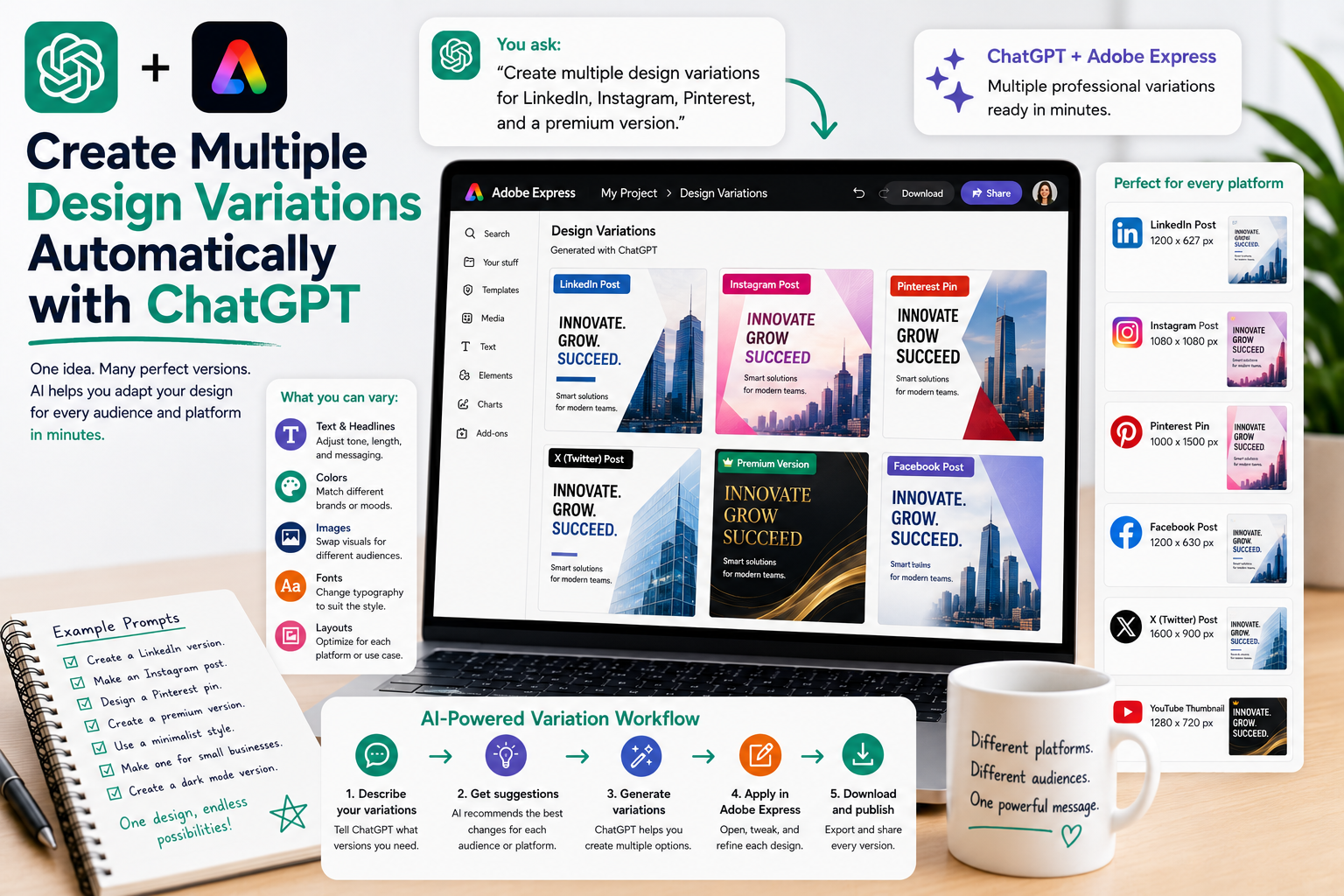
Create Platform-Specific Versions
Every social platform has different design expectations.
Instagram:
Use vibrant colors and larger headlines.
LinkedIn:
Make the design professional and clean.
Pinterest:
Create a tall vertical version with bold typography.
Facebook:
Use a balanced layout with engaging visuals.
YouTube:
Create a thumbnail with a large title and strong contrast.
Instead of starting over, you simply adapt the original design.
Test Different Design Styles
ChatGPT can also suggest creative alternatives.
Examples:
Create a minimalist version.
Design a luxury version.
Create a colorful version.
Make a dark mode version.
Create a playful version.
Generating several visual styles allows you to compare and choose the strongest design.
Experiment with Branding
Businesses often maintain multiple visual campaigns.
Examples:
Create a version using our blue corporate colors.
Design one with our event branding.
Make a version for holiday promotions.
Create a startup-style variation.
Produce an eco-friendly themed version.
AI helps you maintain consistency while supporting different campaigns.
Create A/B Testing Designs
Marketing teams frequently compare different creative approaches.
Examples:
Create two versions with different headlines.
Generate three different call-to-action designs.
Use different color schemes.
Create one image-focused version and one text-focused version.
Make one formal and one conversational.
Testing multiple variations helps identify which design performs best.
Repurpose Existing Content
Instead of creating new content every time, repurpose successful designs.
Examples:
Turn a:
- Presentation into social graphics
- Blog article into an infographic
- Webinar into promotional graphics
- White paper into LinkedIn posts
- Case study into Pinterest pins
- Newsletter into Instagram posts
One project can generate an entire library of content.
Example Prompts
Here are several prompts you can reuse:
- Create three modern design variations.
- Generate one version for LinkedIn and another for Instagram.
- Create a luxury version using premium colors.
- Design a minimalist alternative.
- Produce a version for small business owners.
- Create a holiday edition.
- Generate multiple headline options.
- Create a version for mobile viewing.
- Design an executive presentation style.
- Produce a colorful promotional version.
Best Practices
For the best results:
- Start with a strong original design.
- Change one major element at a time.
- Keep your branding consistent.
- Match each variation to its audience.
- Test different headlines and visuals.
- Review each version before publishing.
- Save successful designs for future campaigns.
Small adjustments often create the biggest improvements.
Common Mistakes to Avoid
When creating multiple versions, avoid:
- Making every version identical.
- Changing too many elements at once.
- Ignoring platform requirements.
- Using inconsistent branding.
- Forgetting mobile optimization.
- Publishing without reviewing each variation.
Every version should feel intentional while remaining part of the same visual family.
Workflow Example
A typical AI-assisted workflow might look like this:
- Create the original design in Adobe Express.
- Ask ChatGPT to suggest multiple variations.
- Generate audience-specific versions.
- Adapt layouts for different platforms.
- Update colors, typography, and imagery.
- Review each variation.
- Export and publish the finished assets.
This workflow dramatically reduces production time while increasing creative output.
Conclusion
Creating multiple design variations no longer requires hours of repetitive editing. By combining ChatGPT with Adobe Express, you can describe the versions you need using natural language and quickly produce designs tailored to different audiences, platforms, and campaigns.
Whether you’re creating marketing materials, presentations, social media graphics, or business reports, AI-powered design variations help you work faster, stay consistent, and maximize the value of every creative project.
Related Articles
- How ChatGPT Automatically Finds Adobe Express Templates
- Using Natural Language to Edit Adobe Express Designs
- Replace Images with ChatGPT Commands
- Change Fonts Using ChatGPT
- Animate Adobe Express Designs from ChatGPT
- Create Marketing Materials with ChatGPT and Adobe Express
- Create Social Media Graphics with ChatGPT and Adobe Express