Pinterest is more than a social media platform—it’s one of the largest visual search engines on the internet. Unlike many social networks where posts disappear after a few days, Pinterest Pins can continue generating traffic for months or even years.
Because of this long lifespan, creating high-quality Pins is one of the best ways to grow a blog, promote products, generate leads, and build brand awareness.
By combining ChatGPT with Adobe Express, you can create professional Pinterest Pins quickly and consistently. ChatGPT helps you generate ideas, headlines, and descriptions, while Adobe Express transforms those concepts into attractive, editable designs.
In this guide, you’ll learn how to build Pinterest Pins from start to finish using AI.
Why Use ChatGPT and Adobe Express for Pinterest?
Pinterest success depends heavily on visual quality.
A successful Pin usually requires:
- A compelling title
- Strong visual hierarchy
- Eye-catching photography
- Professional typography
- Brand consistency
- Pinterest-friendly dimensions
Instead of designing everything manually, ChatGPT and Adobe Express automate much of the creative process.
Step 1: Decide What Your Pin Promotes
Before generating your design, determine the purpose of the Pin.
Common Pinterest content includes:
- Blog articles
- Product pages
- Affiliate products
- Online courses
- Digital downloads
- Newsletters
- Webinars
- Case studies
- Tutorials
- Checklists
Knowing the destination helps shape both the design and the messaging.
Step 2: Describe Your Pin in ChatGPT
Open ChatGPT and explain the type of Pinterest Pin you’d like to create.
Example:
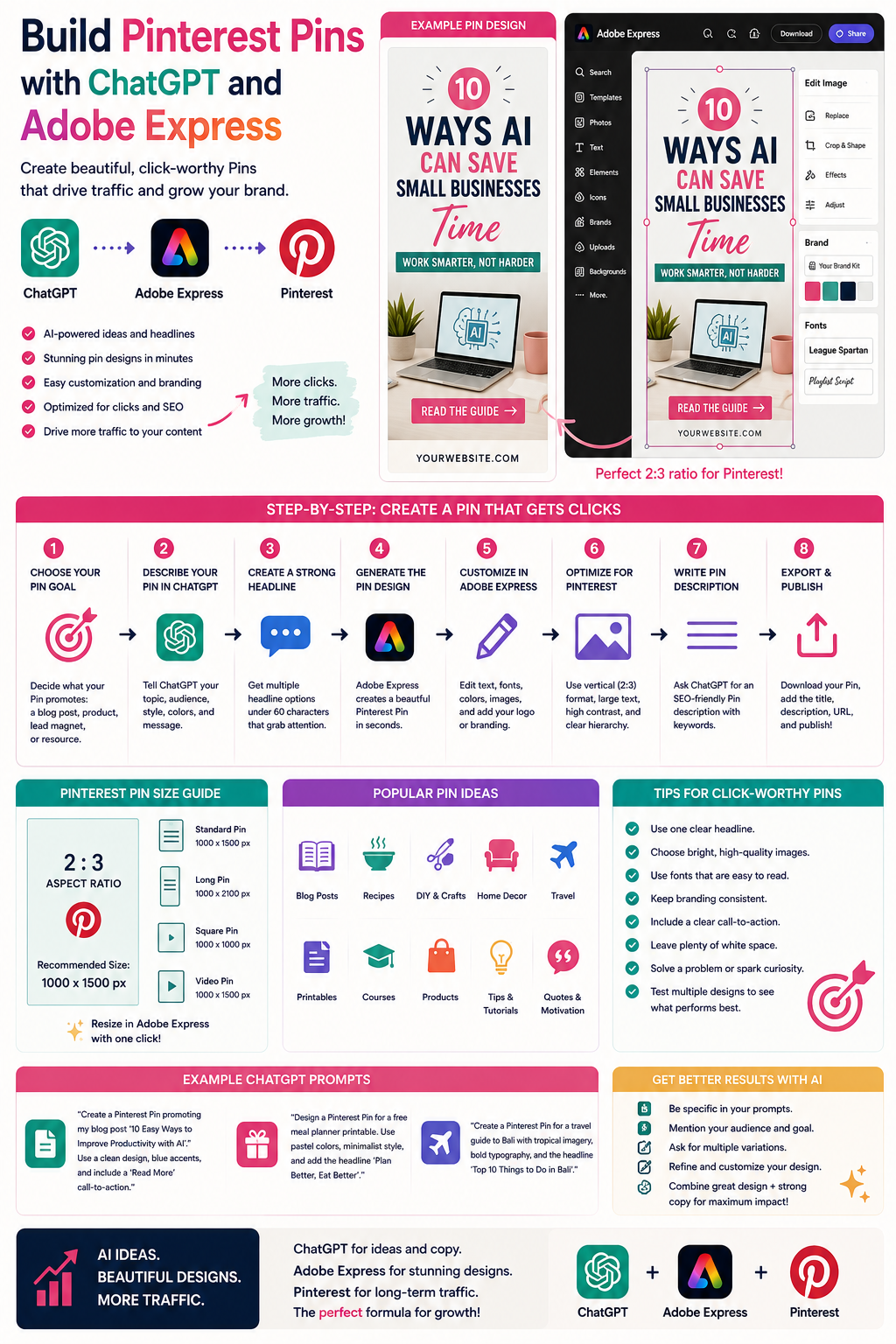
Create a Pinterest Pin promoting our article “10 Ways AI Can Save Small Businesses Time.” Use a clean white background, blue accents, modern typography, and include a “Read More” call-to-action.
Or:
Design a Pinterest Pin promoting a printable weekly planner using pastel colors and minimalist styling.
Detailed prompts usually produce stronger results.
Step 3: Create a Pinterest-Friendly Headline
Pinterest users scan quickly.
Ask ChatGPT to generate several headline options.
Example prompt:
Give me ten Pinterest titles under 60 characters for an article about AI productivity.
You can then choose the version that best matches your audience.
Step 4: Generate the Pin Design
Adobe Express creates the initial Pinterest design.
The AI typically generates:
- Vertical layout
- Large headline
- Supporting imagery
- Brand colors
- Decorative elements
- Call-to-action
- Visual hierarchy
This provides an excellent starting point that you can refine further.
Step 5: Customize in Adobe Express
Open your design inside Adobe Express.
Now personalize every element.
You can:
- Replace images
- Upload product photos
- Change colors
- Update typography
- Add your logo
- Insert icons
- Improve spacing
- Apply your Brand Kit
Consistent branding makes your Pins instantly recognizable.
Step 6: Optimize for Pinterest
Pinterest favors vertical graphics.
A commonly recommended size is:
1000 × 1500 pixels (2:3 aspect ratio)
Adobe Express makes it easy to resize your designs while maintaining quality.
Remember to:
- Use large, readable text.
- Leave generous spacing.
- Make the headline easy to scan.
- Include a clear call-to-action.
Step 7: Generate the Pin Description
ChatGPT can also help write SEO-friendly Pin descriptions.
Example prompt:
Write a Pinterest description for an article about AI productivity. Include relevant keywords, keep it engaging, and encourage readers to click through.
A strong description helps Pinterest understand your content and may improve discoverability.
Step 8: Export and Publish
Once your Pin is complete:
- Download the image.
- Upload it to Pinterest.
- Add the title.
- Paste the description.
- Include the destination URL.
- Publish your Pin.
Many creators also schedule Pins in advance as part of a consistent publishing strategy.
Example Prompt Library
Blog Promotion
Design a Pinterest Pin promoting an article titled “25 ChatGPT Prompts Every Business Should Know.” Use modern typography, blue gradients, and a clean layout.
Online Course
Create a Pinterest Pin advertising our beginner Photoshop course using bold typography, bright colors, and a “Start Learning” button.
Printable
Design a Pinterest graphic promoting a free meal planner printable using soft pastel colors and elegant typography.
Recipe
Create a Pinterest Pin for a healthy smoothie recipe featuring vibrant fruit photography and a clean recipe title.
E-commerce
Design a Pinterest Pin promoting handmade candles with warm neutral colors, product photography, and the headline “Shop the Collection.”
Tips for Better Pinterest Pins
Successful Pinterest graphics often include:
- Vertical layout
- One clear headline
- Bright, high-quality images
- Plenty of white space
- Consistent branding
- Easy-to-read fonts
- One clear message
Pinterest users often decide whether to click within seconds, so clarity is essential.
Common Mistakes
Avoid prompts like:
Make a Pinterest Pin.
Instead write:
Create a vertical Pinterest Pin promoting our article “How to Start a Small Business Using AI.” Use a white background, blue and green accents, modern typography, an AI-themed illustration, and include a “Read the Guide” call-to-action.
The more context you provide, the better the AI can tailor the design.
Best Workflow
Many Pinterest marketers use a workflow like this:
- Brainstorm article ideas with ChatGPT.
- Generate multiple Pin headlines.
- Create the Pin in Adobe Express.
- Customize the branding.
- Generate a keyword-rich description.
- Export at Pinterest dimensions.
- Publish or schedule the Pin.
- Repeat for multiple blog posts or products.
Creating several Pins for the same piece of content can also help you test which designs perform best.
Who Should Use This Workflow?
This approach is ideal for:
- Bloggers
- Affiliate marketers
- E-commerce businesses
- Course creators
- Coaches
- Digital product sellers
- Freelancers
- Interior designers
- Food bloggers
- Travel bloggers
Anyone looking to generate long-term website traffic from Pinterest can benefit from AI-assisted Pin creation.
Conclusion
Building Pinterest Pins with ChatGPT and Adobe Express combines the creativity of conversational AI with Adobe’s powerful design tools. ChatGPT helps you generate compelling headlines, descriptions, and visual concepts, while Adobe Express quickly transforms those ideas into polished, editable Pins.
Whether you’re promoting blog posts, products, services, or digital downloads, this workflow allows you to create professional Pinterest graphics faster, maintain consistent branding, and publish content that is designed to attract clicks and drive traffic over the long term.
Frequently Asked Questions
What size should a Pinterest Pin be?
Pinterest generally recommends a 2:3 aspect ratio, with 1000 × 1500 pixels being one of the most commonly used sizes.
Can ChatGPT write Pinterest titles and descriptions?
Yes. ChatGPT can generate SEO-friendly titles, descriptions, keyword ideas, and calls to action for your Pins.
Can I use my Brand Kit?
Yes. Adobe Express Premium allows you to apply your Brand Kit so your Pins stay consistent with your brand identity.
Should I create multiple Pins for the same content?
Yes. Creating several visual variations for the same article or product is a common Pinterest marketing strategy and can help you discover which design performs best.
Related Articles
- Generate an Instagram Post with ChatGPT and Adobe Express
- Create LinkedIn Graphics Using ChatGPT and Adobe Express
- Design Facebook Ads with ChatGPT and Adobe Express
- Best ChatGPT Prompts for Adobe Express
- How to Create Your First Social Media Graphic with ChatGPT and Adobe Express