Launching a successful marketing campaign often requires dozens of creative assets, multiple rounds of revisions, and coordination across different channels. From social media graphics and email banners to presentations and promotional flyers, creating everything manually can quickly become time-consuming.
The Adobe Express Productivity Agent streamlines this entire process by helping you plan, generate, refine, and publish marketing materials using natural language prompts. Instead of building each asset from scratch, you can describe your campaign goals and let AI assist throughout the creative workflow.
In this guide, you’ll learn how to use the Productivity Agent to create complete, end-to-end marketing campaigns more efficiently.
What Is an End-to-End Marketing Campaign?
An end-to-end marketing campaign is a coordinated set of marketing activities designed to achieve a specific business objective.
A campaign typically includes:
- Campaign messaging
- Brand visuals
- Social media posts
- Email marketing assets
- Promotional banners
- Flyers and posters
- Landing page graphics
- Presentations
- Digital advertisements
- Calls to action
The Productivity Agent helps generate and refine these assets while maintaining consistent branding and messaging.
Why Use the Productivity Agent?
Instead of creating every design individually, the Productivity Agent serves as your AI-powered creative assistant.
It can help you:
- Brainstorm campaign ideas
- Generate marketing copy
- Design branded graphics
- Create multiple asset variations
- Adapt content for different platforms
- Speed up repetitive design tasks
- Maintain visual consistency
This allows marketers to focus more on strategy and less on production.
Step 1: Define Your Campaign Objective
Begin by describing your campaign goal.
Examples include:
- Promote a new product launch
- Announce a seasonal sale
- Generate webinar registrations
- Increase newsletter subscriptions
- Launch a new service
- Build brand awareness
- Drive website traffic
- Promote an upcoming event
Example prompt:
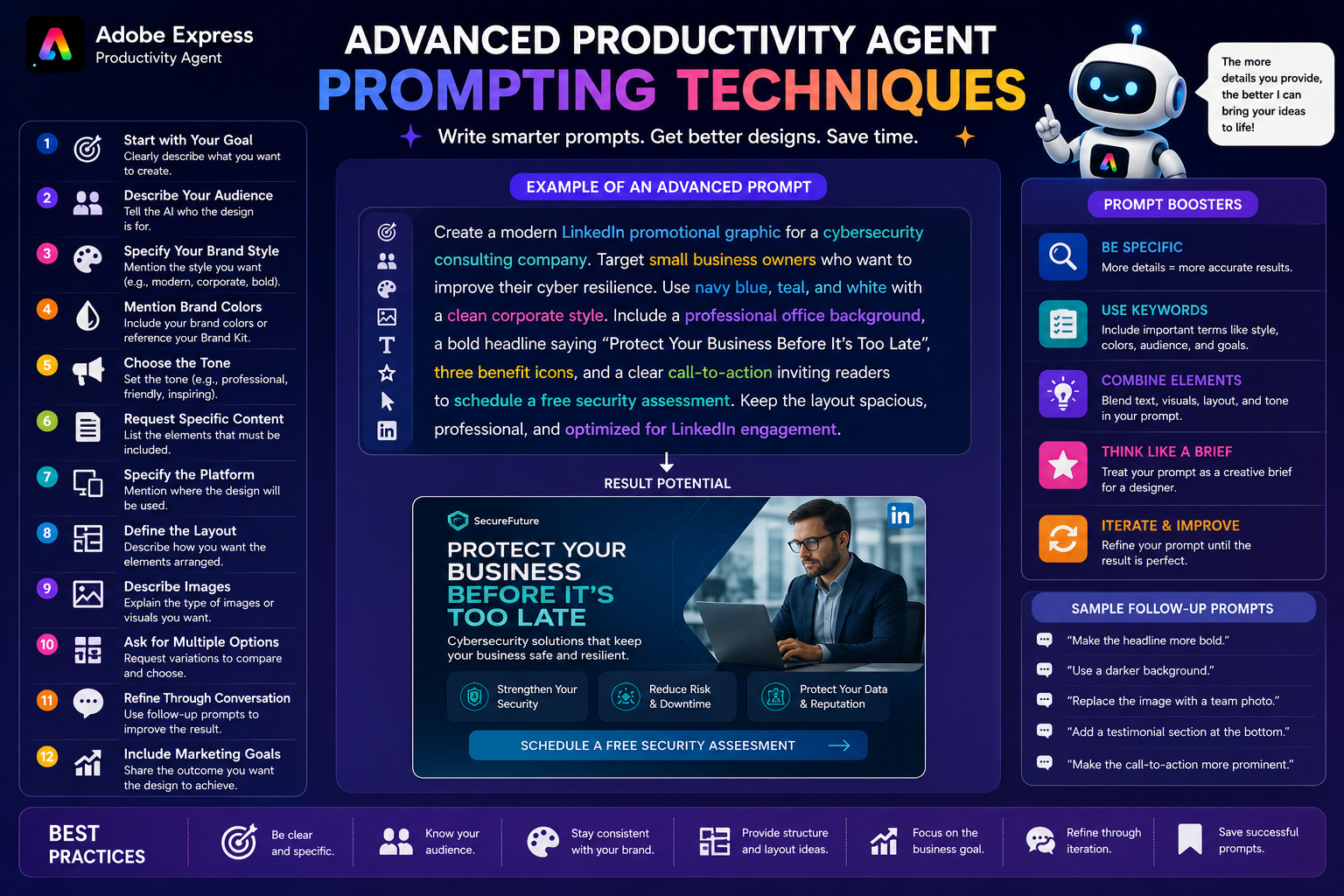
Create a marketing campaign promoting our new online design course for small business owners.
Providing a clear objective helps the Productivity Agent generate more relevant content.
Step 2: Identify Your Target Audience
Tell the AI exactly who you’re trying to reach.
Examples include:
- Entrepreneurs
- Students
- Teachers
- Small businesses
- Corporate professionals
- Marketing teams
- Real estate agents
- Fitness enthusiasts
Example:
Target small business owners looking to improve their social media presence.
Audience information influences the tone, imagery, and messaging.
Step 3: Describe Your Brand
The Productivity Agent performs best when it understands your visual identity.
Include information such as:
- Brand colors
- Fonts
- Logo
- Preferred imagery
- Tone of voice
- Brand personality
Example:
Use our navy blue and teal color palette with a modern, professional style and clean typography.
If you’ve configured a Brand Kit in Adobe Express, the agent can help maintain visual consistency across assets.
Step 4: Generate Campaign Messaging
Ask the Productivity Agent to help develop campaign copy before designing visuals.
For example:
Create five headline options for a summer promotion.
Or:
Write a friendly call-to-action encouraging users to register today.
The AI can generate:
- Headlines
- Subheadings
- Product descriptions
- Promotional text
- Email copy
- Social captions
- Calls to action
Generating messaging first creates a strong foundation for the rest of the campaign.
Step 5: Create Campaign Visuals
Once your messaging is ready, ask the Productivity Agent to generate designs.
Examples include:
- Instagram posts
- Facebook ads
- LinkedIn graphics
- Pinterest Pins
- Posters
- Flyers
- Email banners
- Presentation slides
- Event graphics
- Website banners
Example prompt:
Create a modern Instagram promotional graphic using our brand colors with the headline “Summer Sale Starts Today.”
Step 6: Build Multiple Variations
Marketing campaigns rarely rely on a single asset.
Ask the Productivity Agent to generate multiple versions.
Examples:
- Three color variations
- Two layout options
- Different headlines
- Alternative calls to action
- Mobile-friendly versions
- Platform-specific formats
Testing multiple creative variations often leads to stronger campaign performance.
Step 7: Adapt Content for Different Platforms
Every platform has different requirements.
The Productivity Agent can help tailor assets for:
- X
- Email newsletters
- Websites
- Presentations
- Print materials
Instead of recreating each design manually, you can ask the AI to resize or adapt existing concepts while preserving your branding.
Step 8: Refine Through Conversation
One of the Productivity Agent’s greatest strengths is its conversational workflow.
You can continue refining your campaign by asking follow-up questions such as:
- Make the colors brighter.
- Add more white space.
- Use a stronger headline.
- Replace the hero image.
- Make the layout more minimal.
- Use a more professional tone.
- Increase emphasis on the discount.
- Move the call-to-action higher.
Each prompt builds upon the previous design, reducing repetitive editing.
Step 9: Review Brand Consistency
Before publishing, review every asset to ensure consistency.
Check for:
- Fonts
- Colors
- Logo placement
- Tone of voice
- Image style
- Calls to action
- Messaging
- Visual hierarchy
Consistent branding strengthens recognition and builds trust with your audience.
Step 10: Publish and Measure Results
Once your assets are finalized, publish them across your chosen channels.
After launch, evaluate performance using metrics such as:
- Reach
- Engagement
- Click-through rate
- Conversion rate
- Website traffic
- Leads generated
- Sales
- Return on investment (ROI)
Use these insights to refine future campaigns and improve results over time.
Example Campaign Workflow
Imagine you’re launching a new online workshop.
Your workflow might look like this:
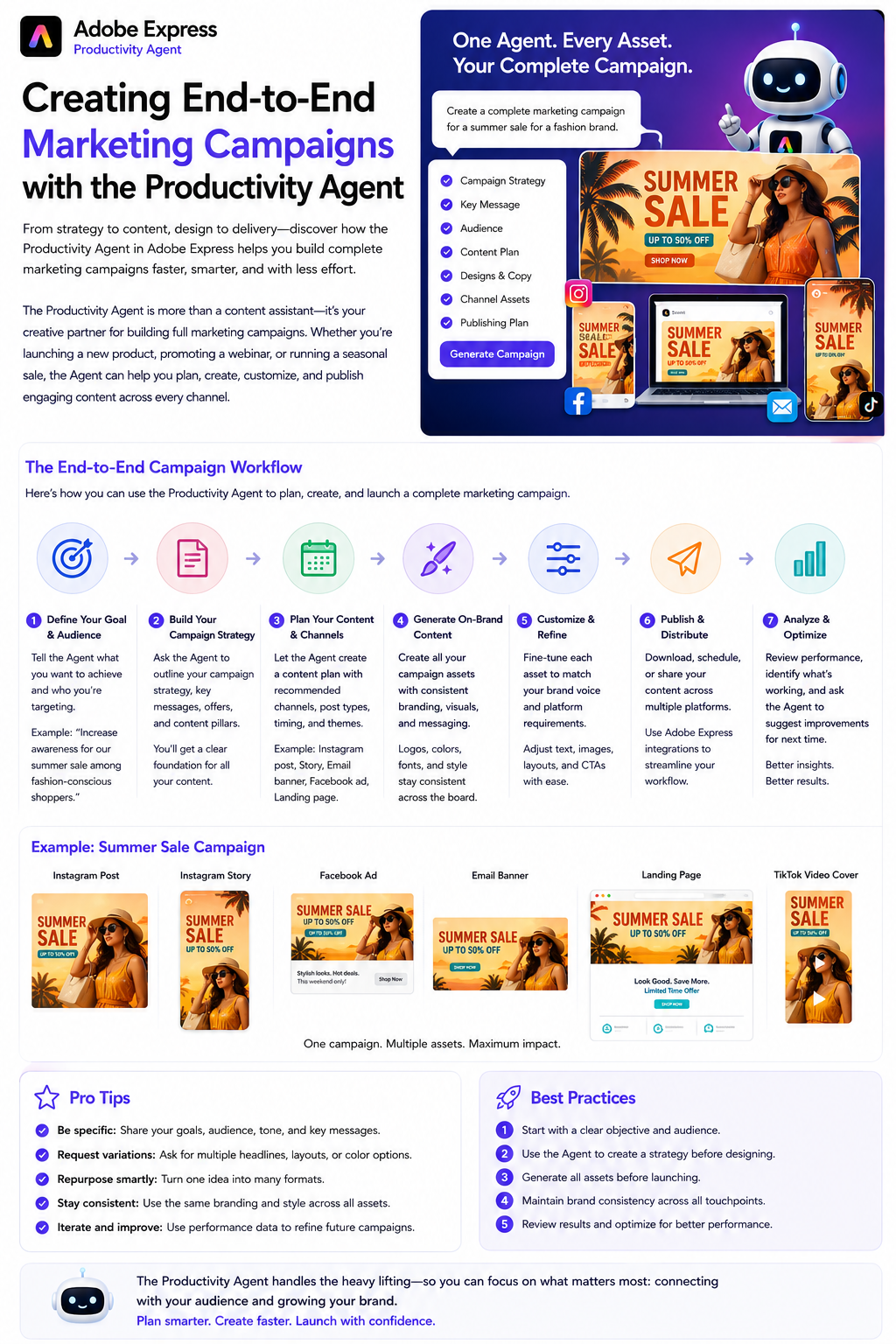
- Define the campaign objective.
- Identify the target audience.
- Generate campaign messaging.
- Create Instagram posts.
- Design LinkedIn graphics.
- Produce email banners.
- Create presentation slides.
- Design promotional flyers.
- Generate multiple creative variations.
- Publish and monitor performance.
Instead of switching between multiple applications, the Productivity Agent assists throughout the process.
Best Practices
To get the best results:
- Start with a clear campaign goal.
- Define your audience.
- Reference your Brand Kit.
- Provide detailed prompts.
- Request multiple design variations.
- Adapt assets for each platform.
- Review every design before publishing.
- Refine using conversational prompts.
- Save successful prompts for future campaigns.
- Measure campaign performance and iterate.
These habits help you build faster, more consistent marketing campaigns.
Frequently Asked Questions
Can the Productivity Agent create an entire campaign?
It can assist with many parts of the creative process, including generating ideas, writing marketing copy, designing visuals, and adapting assets for different platforms. Final review and approval should always remain with you.
Does it keep branding consistent?
Yes. When you provide brand colors, fonts, logos, or use an Adobe Express Brand Kit, the Productivity Agent can help maintain a consistent visual identity across campaign materials.
Can I generate multiple versions of the same design?
Absolutely. Creating alternative layouts, headlines, color schemes, and calls to action is an excellent way to test different creative approaches.
Is it suitable for small businesses?
Yes. The Productivity Agent is especially valuable for small businesses, freelancers, and marketing teams that want to create professional campaigns without investing large amounts of time in manual design work.
Final Thoughts
The Adobe Express Productivity Agent transforms campaign creation from a collection of disconnected design tasks into a streamlined, AI-assisted workflow. By helping you generate ideas, write compelling copy, create branded visuals, adapt content for multiple platforms, and refine assets through natural conversation, it enables faster production without sacrificing quality.
Whether you’re launching a new product, promoting a seasonal sale, announcing an event, or building long-term brand awareness, the Productivity Agent can significantly reduce the time spent creating marketing assets while helping maintain a professional and consistent brand presence across every channel.