Adobe offers many creative and productivity tools, but two products that often confuse users are Adobe Acrobat Pro and Adobe Express Premium. Both are subscription-based applications, both are part of the Adobe ecosystem, and both can work with PDFs. However, they are designed for very different purposes.
The simplest way to think about it is this:
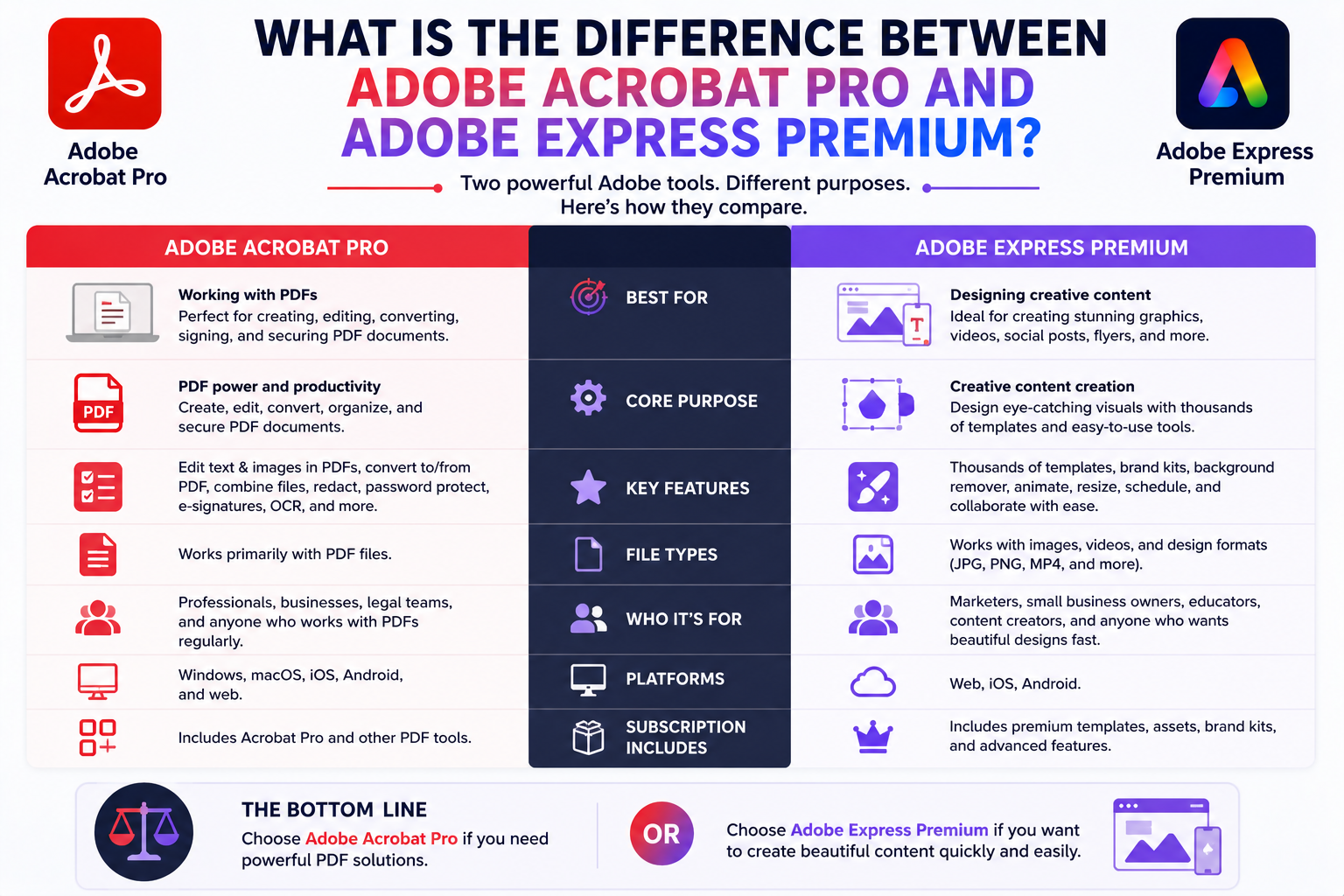
Adobe Acrobat Pro is a PDF and document management tool. Adobe Express Premium is a content creation and graphic design platform.
While there is some overlap between the two, they solve different problems and target different audiences.
In this guide, we’ll compare Adobe Acrobat Pro and Adobe Express Premium to help you decide which one best fits your needs.

Quick Answer
Choose Adobe Acrobat Pro If You Need:
- PDF editing
- PDF conversion
- Electronic signatures
- Document security
- Form creation
- OCR (Optical Character Recognition)
- Enterprise document workflows
Choose Adobe Express Premium If You Need:
- Social media graphics
- Marketing materials
- AI-generated images
- Video creation
- Presentations
- Branding tools
- Content creation
The right choice depends entirely on what you are trying to accomplish.
What Is Adobe Acrobat Pro?
Adobe Acrobat Pro
is Adobe’s professional PDF solution.
Its primary purpose is managing digital documents.
Common tasks include:
Editing PDFs
Converting Files
Creating Forms
Collecting Signatures
Protecting Documents
Reviewing Contracts
OCR Scanning
PDF Collaboration
Acrobat Pro is heavily used in business environments.
What Is Adobe Express Premium?
Adobe Express Premium is Adobe’s content creation platform.
It focuses on:
Graphic Design
Social Media Content
Marketing Materials
Video Editing
AI-Powered Creativity
Brand Management
Presentations
Promotional Content
Express is aimed at creators, marketers, educators, and small businesses.
Primary Purpose
Acrobat Pro
Designed for:
Documents
PDFs
Contracts
Forms
Signatures
Compliance
Express Premium
Designed for:
Content Creation
Graphics
Marketing
Social Media
Videos
Branding
This is the biggest difference between the two products.
PDF Editing
Winner: Acrobat Pro
Acrobat Pro offers:
Full PDF Editing
Text Editing
Page Management
OCR
Form Creation
Redaction
Security Controls
Digital Signatures
Express can perform some basic PDF tasks, but Acrobat Pro is vastly more powerful.
Graphic Design
Winner: Express Premium
Express excels at creating:
Flyers
Posters
Social Media Posts
Presentations
Marketing Graphics
Promotional Content
Acrobat Pro is not designed for graphic design.
Social Media Content
Winner: Express Premium
Adobe Express includes templates for:
YouTube
TikTok
Acrobat Pro has no social media design functionality.
AI Features
Winner: Express Premium
Adobe Express integrates:
Adobe Firefly
which provides:
AI Image Generation
Generative Fill
Text Effects
Background Expansion
AI Text Assistance
Acrobat Pro includes AI-powered document tools but focuses primarily on document workflows.
Electronic Signatures
Winner: Acrobat Pro
Acrobat Pro supports:
E-Signatures
Approval Workflows
Contract Signing
Document Tracking
Signature Requests
These features are essential for many businesses.
Adobe Express does not offer this functionality.
Form Creation
Winner: Acrobat Pro
Acrobat Pro allows users to:
Create Fillable Forms
Add Form Fields
Collect Responses
Build Interactive PDFs
Adobe Express does not provide advanced form creation tools.
Brand Management
Winner: Express Premium
Express Premium includes:
Brand Kits
Logo Libraries
Color Systems
Brand Fonts
Shared Templates
These features help maintain visual consistency.
Acrobat Pro focuses on documents rather than branding.
Video Editing
Winner: Express Premium
Express supports:
Video Trimming
Social Videos
Promotional Clips
Captions
Templates
Acrobat Pro has no video editing tools.
Marketing Materials
Winner: Express Premium
Express is built for:
Advertising
Promotions
Event Marketing
Content Marketing
Campaign Assets
Acrobat Pro is not intended for marketing content.
Document Security
Winner: Acrobat Pro
Acrobat Pro provides:
Password Protection
Permissions
Redaction
Compliance Features
Document Tracking
These capabilities are critical in regulated industries.
Collaboration
Acrobat Pro
Best for:
- Document reviews
- PDF comments
- Approvals
Express Premium
Best for:
- Creative collaboration
- Shared templates
- Brand consistency
Both support collaboration, but in different ways.
Who Uses Acrobat Pro?
Typical Acrobat Pro users include:
Lawyers
Accountants
HR Departments
Government Agencies
Corporate Teams
Compliance Officers
Contract Managers
These professionals work heavily with documents.
Who Uses Express Premium?
Typical Express users include:
Marketers
Small Businesses
Social Media Managers
Educators
Content Creators
Entrepreneurs
Agencies
These users focus on creating content rather than managing documents.
Acrobat Pro vs Express Premium Comparison
| Feature | Acrobat Pro | Express Premium |
|---|---|---|
| PDF Editing | ✓✓✓ | Basic |
| E-Signatures | ✓✓✓ | ✗ |
| OCR | ✓✓✓ | ✗ |
| Form Creation | ✓✓✓ | ✗ |
| Graphic Design | ✗ | ✓✓✓ |
| Social Media Graphics | ✗ | ✓✓✓ |
| Video Editing | ✗ | ✓✓ |
| AI Image Generation | ✗ | ✓✓✓ |
| Brand Kits | ✗ | ✓✓✓ |
| Marketing Content | ✗ | ✓✓✓ |
Can You Use Both Together?
Absolutely.
Many businesses use:
Adobe Acrobat Pro
for document workflows
and
Adobe Express
for content creation and marketing.
The two products complement each other well.
Which Provides More Value?
It depends on your workflow.
Acrobat Pro Provides More Value If:
- You work with PDFs daily
- You manage contracts
- You collect signatures
- You require document security
Express Premium Provides More Value If:
- You create content regularly
- You manage social media
- You build marketing campaigns
- You need design tools
Neither is inherently better—they simply solve different problems.
Frequently Asked Questions
Is Adobe Acrobat Pro the same as Adobe Express Premium?
No. Acrobat Pro focuses on PDF and document management, while Express Premium focuses on content creation and graphic design.
Can Adobe Express edit PDFs?
Yes, but only at a basic level compared to Acrobat Pro.
Can Acrobat Pro create social media graphics?
No. Acrobat Pro is not designed for graphic design or marketing content.
Which is better for businesses?
It depends on the business need. Document-heavy organizations often prefer Acrobat Pro, while marketing-focused teams benefit more from Express Premium.
Do I need both?
Many businesses find value in using both tools because they serve different purposes.
Final Verdict
Adobe Acrobat Pro and Adobe Express Premium are built for entirely different workflows. Acrobat Pro is a professional document management solution focused on PDFs, forms, signatures, security, and compliance. Adobe Express Premium is a creative platform focused on graphic design, social media content, AI-powered creativity, branding, and marketing materials. If your work revolves around documents and PDFs, Acrobat Pro is the clear choice. If your goal is to create engaging visual content, Adobe Express Premium is the better option. Many organizations ultimately benefit from using both as complementary tools within the Adobe ecosystem.