Adobe Express has evolved into more than a standalone design application. With its integration into ChatGPT, you can now create, edit, and refine visual content through a conversational interface. Instead of opening Adobe Express first and manually searching for templates or tools, you can simply describe what you want to create in ChatGPT, and Adobe Express helps bring those ideas to life.
This integration combines ChatGPT’s natural language capabilities with Adobe Express’s professional design tools, making it easier than ever for beginners, marketers, educators, and businesses to produce high-quality content.
What Is Adobe Express for ChatGPT?
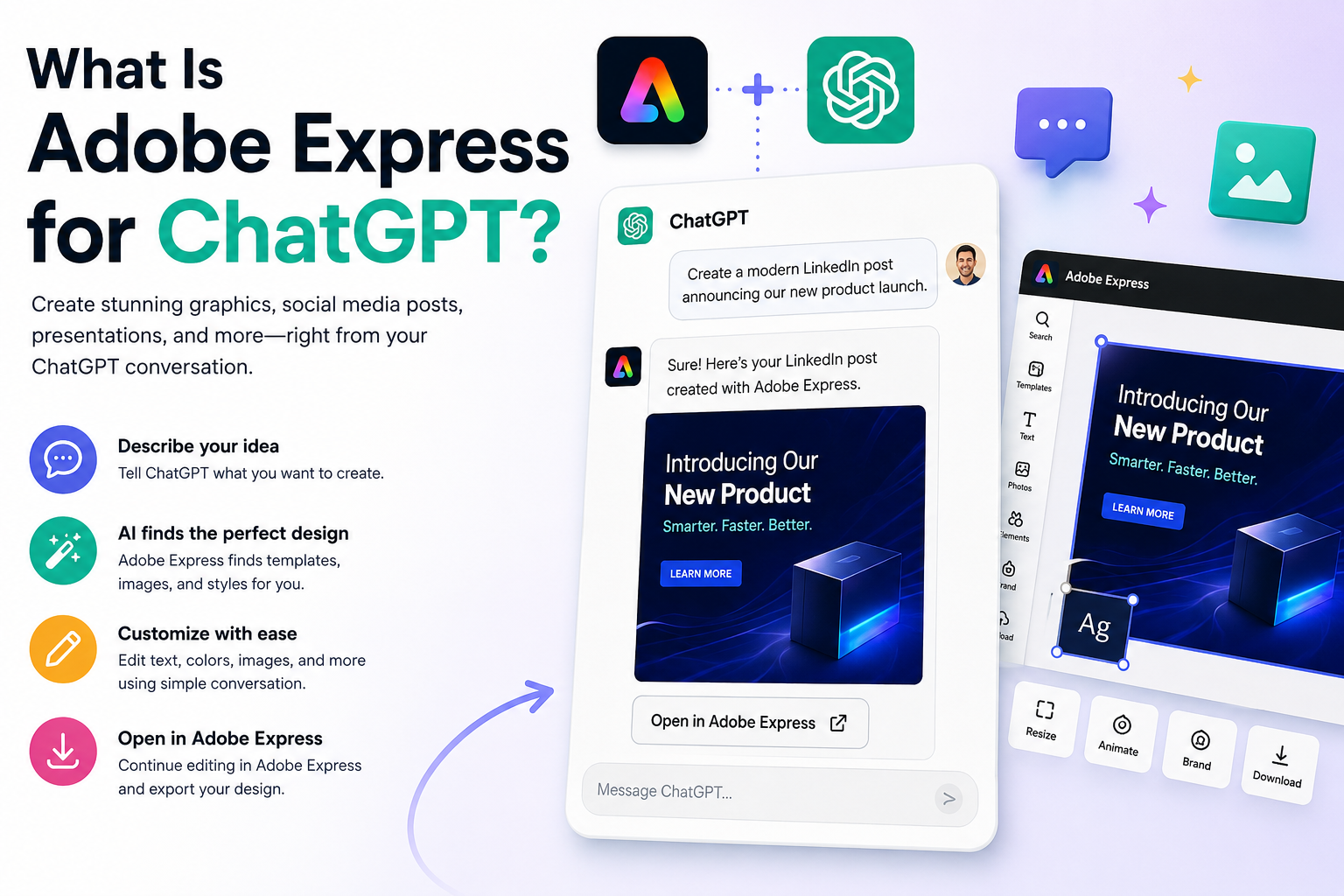
Adobe Express for ChatGPT is an integration that allows ChatGPT to work with Adobe Express during your conversations. Rather than designing everything manually, you can describe your project in plain English.
For example, you might say:
- Create a LinkedIn announcement for our product launch.
- Design a flyer for a charity event.
- Generate a Pinterest pin promoting my blog.
- Build a presentation cover for a cybersecurity webinar.
ChatGPT interprets your request and works with Adobe Express to produce a design that you can continue editing.
How Does It Work?
The workflow is straightforward.
- You describe what you want.
- ChatGPT understands your request.
- Adobe Express searches suitable layouts and templates.
- Images, typography, colors, and layouts are assembled.
- The generated design opens in Adobe Express for further editing.
Instead of navigating menus yourself, the conversation becomes the interface.
What Can You Create?
Adobe Express inside ChatGPT supports a wide range of creative projects.
Examples include:
- Instagram posts
- Facebook graphics
- LinkedIn banners
- Pinterest pins
- YouTube thumbnails
- Flyers
- Posters
- Business cards
- Invitations
- Presentations
- Marketing materials
- Social media campaigns
- Blog graphics
Because ChatGPT understands context, you can also request different styles, audiences, or branding in a single prompt.
Why Use ChatGPT Instead of Starting in Adobe Express?
Many people already use ChatGPT to brainstorm ideas.
Instead of switching between multiple applications, you can continue your creative process within the same conversation.
For example:
“Create three different LinkedIn post ideas about cybersecurity.”
After selecting one idea, you can immediately continue with:
“Turn the first idea into a professional Adobe Express graphic.”
The design process becomes much faster because there is no need to explain your project twice.
Benefits of the Integration
Some of the biggest advantages include:
Faster Design Creation
Natural language replaces many manual steps.
Less Searching
ChatGPT can automatically identify suitable templates and layouts based on your request.
Better Creativity
You can experiment with different ideas simply by asking for alternatives.
For example:
- Make it more modern.
- Use a luxury color palette.
- Turn this into a minimalist design.
- Create a version for Instagram Stories.
Who Is It For?
The integration is useful for almost anyone creating visual content.
Common users include:
- Marketing teams
- Small businesses
- Content creators
- Teachers
- Students
- Agencies
- Freelancers
- Non-profit organizations
- HR departments
- Sales teams
Even users with little design experience can quickly create professional-looking graphics.
Can You Still Edit the Design?
Yes.
The generated design is not final.
Once Adobe Express creates your project, you can continue editing it using all the familiar Adobe Express features, including:
- Changing fonts
- Replacing images
- Updating colors
- Applying Brand Kits
- Adding animations
- Resizing for different platforms
- Exporting in multiple formats
Think of ChatGPT as your creative assistant, while Adobe Express remains the professional editing environment.
Is Adobe Express for ChatGPT Free?
Availability depends on your Adobe and ChatGPT accounts, as well as your subscription level. Some capabilities may require a paid Adobe Express plan, a ChatGPT subscription, or both, and Adobe may change feature availability over time.
Best Practices
To get the best results:
- Be specific about your audience.
- Mention your preferred platform.
- Include your brand colors if applicable.
- Describe the visual style.
- Specify the dimensions if needed.
- Ask for multiple versions before choosing one.
The more detailed your request, the better the generated design is likely to be.
Conclusion
Adobe Express for ChatGPT combines conversational AI with Adobe’s design platform, making it possible to move from an idea to a polished visual much faster than traditional design workflows. Whether you’re creating a social media post, a presentation, or marketing material, describing your vision in natural language can significantly reduce the time spent searching for templates and manually assembling layouts.
As Adobe continues to expand AI-powered creative tools, this integration is likely to become an increasingly important part of modern content creation workflows.
Related Articles
- How to Connect Adobe Express to ChatGPT
- How to Sign In to Adobe Express from ChatGPT
- Adobe Express Connector vs Adobe Express Productivity Agent
- Do You Need ChatGPT Plus to Use Adobe Express?
- What Can Adobe Express Do Inside ChatGPT?