Short-form video has become one of the most effective ways to reach new audiences on platforms like Instagram, Facebook, YouTube Shorts, and TikTok. However, producing high-quality Reels consistently often requires planning, editing, designing graphics, writing captions, and creating promotional assets—all of which can take considerable time.
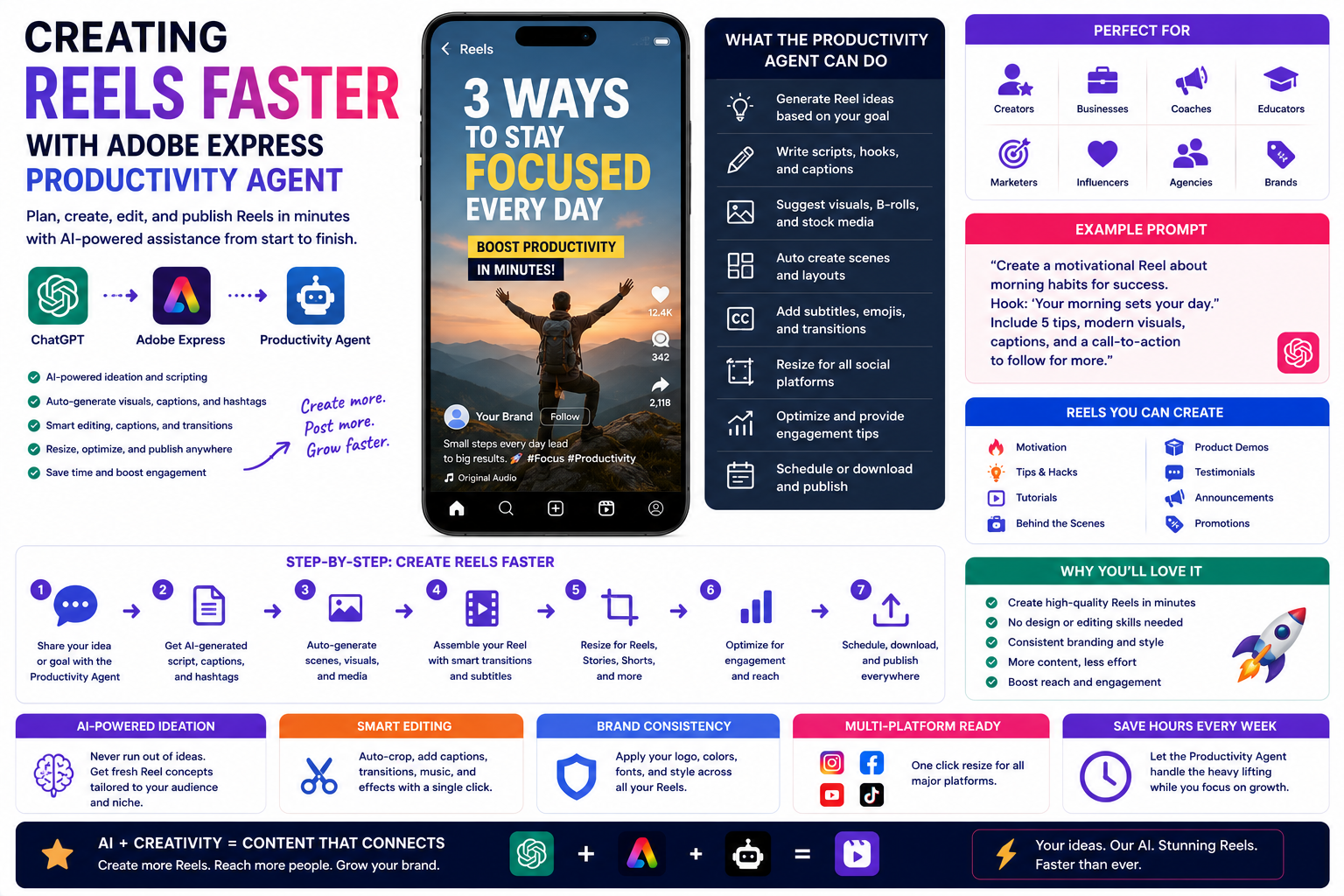
The Adobe Express Productivity Agent helps streamline the entire process by acting as an AI-powered creative assistant. Instead of starting from a blank canvas, you can use natural language prompts to generate ideas, create graphics, suggest layouts, and speed up repetitive design tasks.
In this guide, you’ll learn how to create Reels faster with the Adobe Express Productivity Agent while maintaining a professional and consistent visual style.
What Is the Adobe Express Productivity Agent?
The Productivity Agent is an AI-powered assistant built into Adobe Express that helps users create content using conversational prompts.
Rather than manually building every design element, you simply describe what you want.
For example:
Create a modern Instagram Reel promoting our summer photography course with bold typography and bright colors.
The Productivity Agent generates a design concept that you can customize before publishing.
Why Reels Matter
Short-form videos continue to receive strong visibility across major social media platforms.
Businesses and creators use Reels to:
- Promote products
- Share tutorials
- Teach quick tips
- Showcase behind-the-scenes content
- Announce events
- Build brand awareness
- Increase engagement
- Drive website traffic
Publishing Reels consistently often leads to greater audience growth.
Speed Up the Planning Process
One of the most time-consuming parts of creating Reels is deciding what to make.
The Productivity Agent can generate ideas such as:
- Educational tips
- Product demonstrations
- Industry news
- Frequently asked questions
- Customer success stories
- Before-and-after transformations
- Trending content ideas
- Promotional campaigns
Example prompt:
Suggest ten Reel ideas for a digital marketing agency targeting small businesses.
This gives you a ready-made content plan to work from.
Create Reel Cover Images
The cover image is the first thing viewers notice on your profile.
The Productivity Agent can help generate professional covers featuring:
- Large readable titles
- Consistent branding
- Bold typography
- High-contrast colors
- Modern layouts
- Clear visual hierarchy
Using consistent cover designs creates a polished-looking Instagram profile.
Generate Supporting Graphics
Many Reels benefit from additional visual elements.
Create:
- Title cards
- Intro screens
- End screens
- Call-to-action graphics
- Promotional banners
- Quote graphics
- Feature highlights
- Product callouts
Example prompt:
Design an intro graphic for a Reel explaining five Adobe Express productivity tips.
Maintain Brand Consistency
If you regularly publish Reels, maintaining a recognizable visual identity is important.
Using Adobe Express Brand Kits, the Productivity Agent can apply:
- Company logo
- Brand colors
- Fonts
- Graphic styles
- Templates
- Design elements
This helps every Reel feel like part of the same brand.
Generate Marketing Copy
Creating an engaging Reel involves more than visuals.
The Productivity Agent can also help write:
- Headlines
- Captions
- Calls to action
- Promotional text
- Video descriptions
- Hook ideas
- Closing messages
Example prompt:
Write an engaging Instagram Reel caption encouraging viewers to download our free productivity guide.
Always review AI-generated copy and tailor it to your audience.
Repurpose Existing Content
Instead of creating every Reel from scratch, transform existing content into short-form videos.
For example:
Turn:
- Blog articles into educational Reels
- Webinars into highlight clips
- Podcasts into quote videos
- Tutorials into quick tips
- Presentations into animated summaries
- Customer testimonials into promotional videos
Repurposing content allows you to publish more frequently with less effort.
Create Campaign Assets
If you’re launching a new product or service, the Productivity Agent can generate a complete set of supporting graphics.
Examples include:
- Reel cover image
- Story graphics
- Feed post
- LinkedIn promotion
- Pinterest Pin
- Facebook announcement
- Email banner
- Website graphic
Using consistent branding across all campaign assets strengthens your marketing efforts.
Build a Faster Workflow
A typical Reel production workflow might look like this:
- Brainstorm Reel ideas with the Productivity Agent.
- Select a topic.
- Record your video.
- Generate a Reel cover image.
- Create intro and end graphics.
- Write the caption.
- Design promotional Story graphics.
- Create supporting feed posts.
- Review branding.
- Publish across multiple platforms.
Instead of spending hours on individual design tasks, the Productivity Agent helps accelerate each step.
Best Practices
To create better Reels more efficiently:
- Start with a clear objective.
- Keep videos concise.
- Use large, readable text.
- Maintain consistent branding.
- Create multiple cover variations.
- Write detailed prompts.
- Repurpose existing content.
- Use Adobe Express templates whenever possible.
- Review AI-generated content before publishing.
- Track engagement to improve future Reels.
Frequently Asked Questions
Can the Productivity Agent create Reels?
The Productivity Agent can assist with many creative aspects of Reel production, including generating cover graphics, promotional assets, captions, and design ideas. You are still responsible for recording and editing your video content.
Can it create Reel covers?
Yes. The Productivity Agent can generate professional cover image concepts that align with your branding and make your Reels easier to recognize.
Can it write captions?
Yes. It can suggest captions, headlines, and calls to action that you can review and personalize before publishing.
Is it useful for businesses?
Absolutely. Small businesses, creators, agencies, educators, and marketers can all use the Productivity Agent to speed up Reel production while maintaining a consistent visual identity.
Final Thoughts
Creating engaging Reels doesn’t have to involve hours of manual design work. The Adobe Express Productivity Agent helps simplify the creative process by generating ideas, designing cover graphics, writing captions, and producing supporting marketing assets through simple natural language prompts. While you’ll still create and edit the video itself, AI can dramatically reduce the time spent on the surrounding creative tasks.
By combining the Productivity Agent with Adobe Express templates and Brand Kits, you can build a faster, more consistent workflow that allows you to publish high-quality Reels more frequently. Whether you’re growing a personal brand, promoting products, or managing social media for a business, the Productivity Agent can help you spend less time designing and more time creating valuable video content.