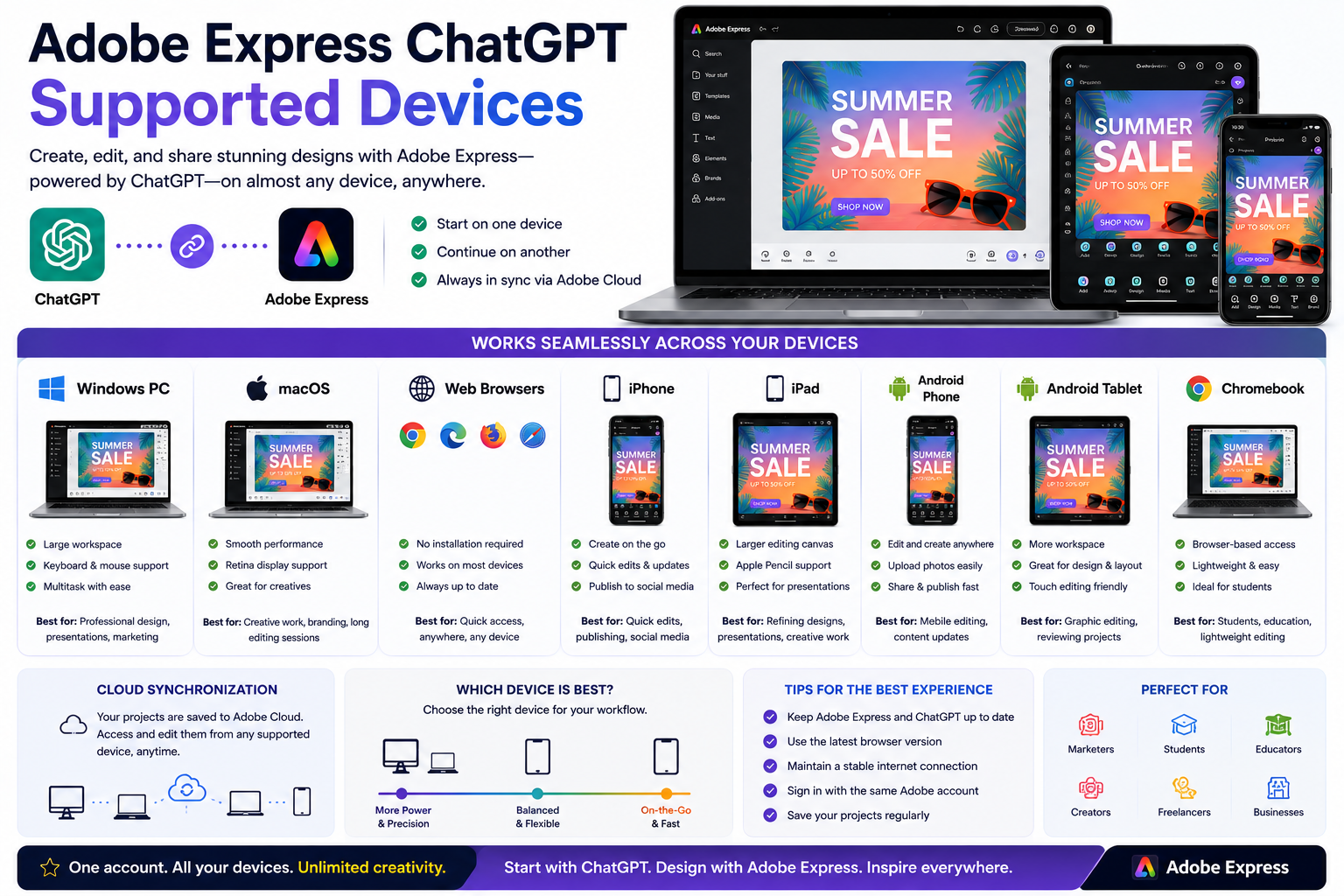
One of the biggest advantages of Adobe Express is that it works across multiple devices, allowing you to start a project on one device and continue it on another. Combined with ChatGPT, this creates a flexible AI-powered design workflow that fits almost any working style.
Whether you’re designing from your desktop computer, editing on a tablet, or making quick updates on your phone, Adobe Express and ChatGPT are designed to work wherever you are.
In this guide, we’ll look at the devices that support Adobe Express with ChatGPT and discuss which ones provide the best experience.
Can You Use Adobe Express with ChatGPT on Any Device?
For the most part, yes.
As long as you have:
- A supported device
- An internet connection
- A ChatGPT account
- An Adobe account
you can access Adobe Express and continue your projects across multiple platforms.
Some features may vary depending on the operating system, browser, or app version.
Windows PCs
Windows offers one of the best environments for Adobe Express and ChatGPT.
Advantages include:
- Large displays
- Full keyboard support
- Mouse precision
- Easy multitasking
- Multiple browser options
- Excellent performance for presentations and marketing materials
For users creating content every day, Windows desktops and laptops provide one of the most productive experiences.
macOS
Adobe Express also performs exceptionally well on Mac computers.
Benefits include:
- Smooth performance
- High-resolution Retina displays
- Excellent browser compatibility
- Creative workflow integration
- Easy switching between Adobe applications
Many designers and marketers choose macOS for long editing sessions.
Web Browsers
One of Adobe Express’s strengths is that much of the experience is available directly through your browser.
Supported browsers typically include:
- Google Chrome
- Microsoft Edge
- Mozilla Firefox
- Apple Safari
Using the latest browser version helps ensure the best compatibility with Adobe Express and ChatGPT.
iPhone
Adobe Express works well on the iPhone for creators who need flexibility.
You can:
- Edit existing projects
- Create social media posts
- Update marketing graphics
- Publish content quickly
- Continue projects started on your desktop
The mobile app is especially useful for content creators working while traveling.
iPad
The iPad provides a balance between desktop productivity and mobile convenience.
Advantages include:
- Larger editing canvas
- Touch interface
- Apple Pencil support (where applicable)
- Easy presentation editing
- Comfortable design adjustments
Many users prefer the iPad for reviewing and refining projects.
Android Phones
Android users can also access Adobe Express.
Typical uses include:
- Creating social media graphics
- Editing projects
- Uploading photos
- Publishing content
- Managing marketing campaigns
The experience varies slightly depending on screen size and device performance.
Android Tablets
Android tablets offer additional workspace compared to phones.
They’re useful for:
- Presentation editing
- Graphic design
- Marketing materials
- Educational content
- Reviewing AI-generated designs
A larger display makes editing significantly easier than on smaller mobile screens.
Chromebooks
Adobe Express also works well on many Chromebooks through the web version.
This makes it popular among:
- Students
- Teachers
- Schools
- Educational organizations
Because everything runs in the browser, no complex installation is usually required.
Which Device Works Best with ChatGPT?
If you’re actively using ChatGPT to generate Adobe Express projects, desktop computers generally provide the smoothest workflow.
You can:
- Keep ChatGPT open in one tab.
- Open Adobe Express in another.
- Copy ideas between applications.
- Review larger designs.
- Edit with a keyboard and mouse.
For detailed creative work, desktops and laptops remain the most productive option.
Mobile Workflow
Mobile devices are ideal when you’re away from your desk.
A common workflow looks like this:
- Brainstorm ideas with ChatGPT.
- Generate an Adobe Express project.
- Open the project in the Adobe Express mobile app.
- Make quick edits.
- Publish directly to social media.
This workflow is particularly useful for influencers, freelancers, and small business owners.
Cloud Synchronization
One of Adobe Express’s strongest features is cloud synchronization.
For example:
- Start a presentation on Windows.
- Continue editing on your MacBook.
- Make final adjustments on your iPad.
- Publish from your iPhone.
Everything stays connected through your Adobe account.
Device Comparison
| Device | Recommended? | Best For |
|---|---|---|
| Windows PC | ⭐⭐⭐⭐⭐ | Professional design, presentations, marketing |
| Mac | ⭐⭐⭐⭐⭐ | Creative work, branding, long editing sessions |
| Chromebook | ⭐⭐⭐⭐☆ | Students, education, lightweight editing |
| iPad | ⭐⭐⭐⭐⭐ | Presentation editing, creative refinement |
| Android Tablet | ⭐⭐⭐⭐☆ | Graphic editing, reviewing projects |
| iPhone | ⭐⭐⭐⭐☆ | Quick edits, publishing, social media |
| Android Phone | ⭐⭐⭐⭐☆ | Mobile editing, content updates |
Tips for the Best Experience
To get the most from Adobe Express and ChatGPT:
- Keep both apps updated.
- Use the latest browser version.
- Maintain a stable internet connection.
- Sign in with the same Adobe account across devices.
- Save your projects regularly.
- Use larger screens for detailed editing whenever possible.
Frequently Asked Questions
Can I use Adobe Express and ChatGPT on my phone?
Yes. Supported iPhone and Android devices allow you to access ChatGPT and continue editing projects in Adobe Express.
Is a desktop computer required?
No. While desktops provide the most comfortable editing environment, Adobe Express also works on mobile devices and tablets.
Do my projects sync across devices?
Yes. Projects saved to your Adobe account are synchronized across supported devices, allowing you to continue where you left off.
Which device is best for professional work?
For most professionals, a Windows PC or Mac offers the best balance of performance, screen space, and productivity.
Conclusion
Adobe Express and ChatGPT are designed to support modern, flexible workflows across desktops, laptops, tablets, and smartphones. Whether you’re creating a presentation in your office, editing a social media post on your phone, or refining a flyer on your tablet, your projects remain available through your Adobe account.
For the best overall experience, use a desktop or laptop for planning and detailed editing, then take advantage of mobile devices for quick updates and publishing. This combination allows you to make the most of AI-powered creativity wherever you work.
Related Articles
- What Is Adobe Express for ChatGPT?
- How to Connect Adobe Express to ChatGPT
- Adobe Express ChatGPT Requirements Explained
- Adobe Express App vs Adobe Express Website: Which Should You Use?
- What Can Adobe Express Do Inside ChatGPT?






