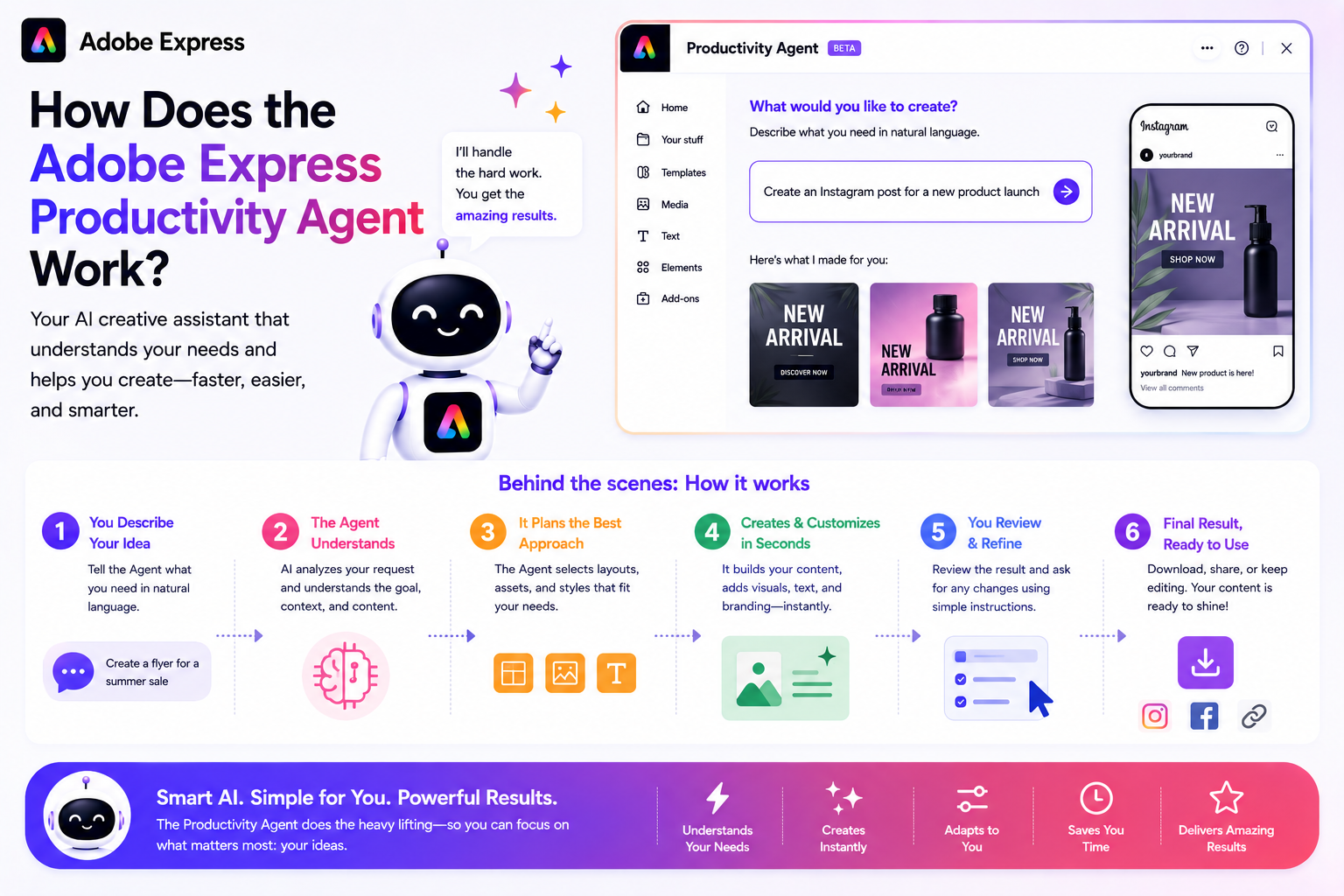
Adobe Express has evolved from a simple design tool into a powerful content creation platform enhanced by artificial intelligence. One of the newest additions is the Adobe Express Productivity Agent, an AI-powered assistant designed to help users create content faster, automate repetitive tasks, and simplify creative workflows.
But how does the Productivity Agent actually work?
In this guide, we’ll break down the technology, workflows, and practical applications behind the Adobe Express Productivity Agent in beginner-friendly terms.
What Is the Adobe Express Productivity Agent?
The Productivity Agent is an AI-driven assistant integrated into Adobe Express.
Instead of manually completing every step of a design or content creation process, users can describe what they want to achieve, and the Productivity Agent helps perform many of the required actions automatically.
Think of it as a creative co-pilot that assists with:
- Design creation
- Content generation
- Asset organization
- Workflow automation
- Brand consistency
- Multi-format publishing
Its goal is to reduce repetitive work and allow users to focus on creativity and strategy.
The Basic Workflow
At a high level, the Productivity Agent follows a simple process:
Step 1: Understand the Request
The user provides a goal.
Examples:
- “Create Instagram posts for my product launch.”
- “Turn this flyer into a LinkedIn graphic.”
- “Generate three variations of this ad.”
- “Resize this design for Pinterest.”
The AI interprets the request and determines the required tasks.
Step 2: Analyze Existing Content
If content already exists, the Productivity Agent examines:
- Images
- Text
- Layouts
- Branding
- Templates
It identifies key elements that should be preserved or adapted.
Step 3: Generate Suggestions
The AI proposes solutions such as:
- New layouts
- Alternative designs
- Marketing copy
- Graphic variations
- Different content formats
This provides users with a starting point rather than forcing them to begin from scratch.
Step 4: Execute Tasks
The Productivity Agent can automate tasks such as:
- Resizing content
- Applying brand colors
- Reformatting designs
- Rewriting text
- Generating images
- Creating social media versions
Multiple actions may happen behind the scenes simultaneously.
Step 5: Present Results
The user reviews the generated output.
At this stage they can:
- Accept suggestions
- Modify designs
- Refine text
- Generate additional variations
The AI assists, but the final decision remains with the user.
How Artificial Intelligence Powers the Productivity Agent
Several AI technologies work together behind the scenes.
Natural Language Processing
The Productivity Agent can understand written instructions.
For example:
“Create a professional LinkedIn post promoting my webinar.”
The AI analyzes:
- The desired platform
- The tone
- The content type
- The objective
It then generates appropriate recommendations.
Generative AI
Generative AI helps create new content.
This may include:
- Marketing copy
- Design layouts
- Visual concepts
- Content variations
- Image generation
Rather than simply editing existing content, the AI can produce entirely new assets.
Context Awareness
The Productivity Agent attempts to understand project context.
For example:
If you’re using a Brand Kit, it may recognize:
- Company colors
- Fonts
- Logos
- Visual identity
This allows generated content to better align with your brand.
Workflow Automation
Many design tasks follow predictable patterns.
Examples include:
- Resizing social media graphics
- Updating logos
- Applying colors
- Reformatting layouts
The Productivity Agent automates these repetitive actions whenever possible.
What Tasks Can the Productivity Agent Automate?
Content Repurposing
One piece of content can become many.
For example:
A blog post can be transformed into:
- Instagram posts
- LinkedIn graphics
- Pinterest Pins
- Presentation slides
- Promotional banners
The Productivity Agent helps streamline this process.
Multi-Platform Content Creation
Different platforms require different dimensions.
The Productivity Agent can help adapt content for:
- TikTok
- YouTube
This saves users from manually recreating each version.
Brand Application
Instead of manually applying brand elements to every design, the Productivity Agent can help:
- Apply logos
- Use approved colors
- Maintain typography standards
- Create consistent visual styles
This is especially useful for teams.
Template Personalization
The AI can assist with adapting templates by:
- Replacing placeholder text
- Updating images
- Adjusting layouts
- Matching brand guidelines
This accelerates content production.
A Real-World Example
Imagine you’re launching a new online course.
Traditionally, you might create:
- A landing page graphic
- An Instagram post
- A Facebook banner
- A LinkedIn image
- A Pinterest Pin
Manually creating all of these assets could take several hours.
With the Productivity Agent:
- You upload your main design.
- You request versions for multiple platforms.
- The AI generates resized and adapted versions.
- You review and refine the results.
The process becomes significantly faster.
Benefits of the Productivity Agent
Faster Production
Content creation becomes quicker.
Less Repetitive Work
Users spend less time performing routine tasks.
Easier Design Process
Non-designers can create professional-looking content more easily.
Improved Consistency
Brand colors, fonts, and layouts can remain consistent across projects.
Increased Scalability
Teams can produce larger volumes of content without proportionally increasing workload.
What the Productivity Agent Cannot Do
Despite its capabilities, the Productivity Agent is not a replacement for human creativity.
It cannot:
- Fully understand complex business strategies
- Guarantee perfect branding
- Replace creative judgment
- Verify factual accuracy automatically
- Understand every design preference
Users should always review AI-generated content before publishing.
Productivity Agent vs Traditional Design Workflow
| Traditional Workflow | Productivity Agent Workflow |
|---|---|
| Manual content creation | AI-assisted creation |
| Repeated resizing | Automated adaptation |
| Multiple design sessions | Single workflow |
| Repetitive editing | Automated tasks |
| More technical expertise required | Beginner-friendly process |
The Future of Adobe Express Productivity
Adobe’s long-term vision appears to be creating a platform where users describe what they want and AI helps execute the work.
Future Productivity Agent capabilities may include:
- More advanced workflow automation
- Better content planning
- Deeper brand intelligence
- Cross-platform campaign generation
- Enhanced collaboration features
As AI continues to improve, the Productivity Agent is likely to become an increasingly central part of the Adobe Express experience.
Final Thoughts
The Adobe Express Productivity Agent works by combining artificial intelligence, automation, and creative tools to simplify content creation. It understands user requests, analyzes existing content, generates recommendations, automates repetitive tasks, and helps users create more content in less time.
For beginners, the Productivity Agent can dramatically reduce the learning curve of design work. For businesses and content creators, it offers a practical way to increase productivity while maintaining quality and brand consistency.
Rather than replacing designers, the Productivity Agent acts as a creative assistant that helps users move from idea to finished content much more efficiently.






