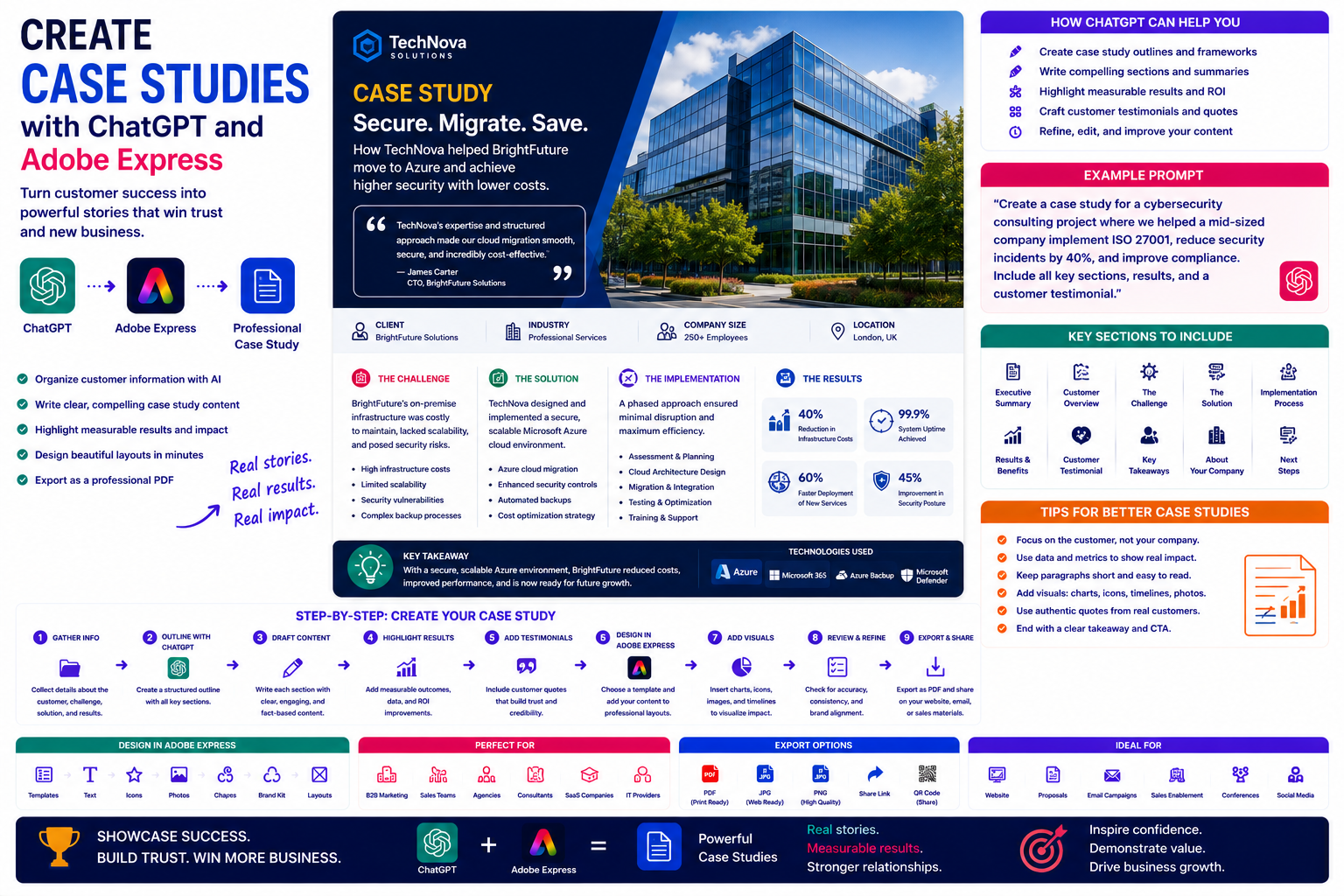
Case studies are one of the most persuasive marketing assets a business can create. Rather than telling potential customers how good your products or services are, a case study demonstrates real-world results through authentic customer stories.
A strong case study explains a customer’s challenge, the solution that was implemented, and the measurable outcomes that followed. Whether you’re a consultant, software company, agency, manufacturer, or service provider, well-written case studies help build credibility and shorten the sales cycle.
Creating professional case studies usually requires interviews, writing, editing, design, and branding. By combining ChatGPT with Adobe Express, you can streamline much of this process while producing polished, professional publications.
In this guide, you’ll learn how to create compelling case studies using AI.
Why Use ChatGPT and Adobe Express?
Developing a case study traditionally involves:
- Interviewing customers
- Organizing notes
- Writing the story
- Highlighting results
- Creating visuals
- Designing layouts
- Applying branding
- Exporting a professional PDF
With ChatGPT and Adobe Express, you can accelerate nearly every stage of this workflow.
Instead of starting with scattered notes, you begin with a clear narrative structure.
What Makes a Great Case Study?
Most successful case studies follow a simple framework:
- Customer background
- Business challenge
- Proposed solution
- Implementation process
- Measurable results
- Customer testimonial
- Conclusion
This structure makes it easy for readers to understand the value you delivered.
What Types of Case Studies Can You Create?
This workflow supports many industries.
Examples include:
- Software implementation
- Marketing campaigns
- Cybersecurity projects
- Website redesigns
- Cloud migrations
- Manufacturing improvements
- Healthcare transformations
- Educational programs
- Non-profit initiatives
- Consulting engagements
Any successful customer project can become a valuable case study.
Step 1: Gather Customer Information
Begin by collecting the essential details.
Examples include:
- Customer name (with permission)
- Industry
- Company size
- Initial challenge
- Goals
- Solution provided
- Results achieved
- Customer feedback
The more complete your information, the stronger your case study will be.
Step 2: Create a Story Outline
Ask ChatGPT to organize the information.
Example prompt:
Create a professional case study outline for an IT consulting project that migrated a company to Microsoft Azure while improving security and reducing infrastructure costs.
Typical sections include:
- Executive Summary
- Customer Overview
- Challenge
- Solution
- Implementation
- Results
- Testimonial
- Key Takeaways
This structure creates a clear narrative from problem to outcome.
Step 3: Draft Each Section
ChatGPT can help write:
- Executive summaries
- Customer background
- Problem descriptions
- Solution explanations
- Project timelines
- Business outcomes
- Lessons learned
- Conclusions
Review the draft carefully to ensure it accurately reflects the customer’s experience.
Step 4: Highlight Measurable Results
The strongest case studies include concrete outcomes.
Examples include:
- Revenue increased by 28%
- Support tickets reduced by 45%
- Deployment time cut by 60%
- Customer satisfaction improved to 96%
- Infrastructure costs reduced by €150,000 annually
Ask ChatGPT to present these results clearly and professionally.
Step 5: Add Customer Testimonials
Testimonials add credibility.
Example prompt:
Rewrite this customer quote into a concise testimonial while preserving its original meaning.
Always ensure testimonials accurately represent the customer’s words and obtain permission where required.
Step 6: Design the Case Study in Adobe Express
Once the content is ready, open Adobe Express.
Create a professional layout using:
- Cover page
- Executive summary
- Timeline
- Quote sections
- Results pages
- Conclusion
Adobe Express provides clean templates that work well for business publications.
Step 7: Add Visual Elements
Visuals help readers quickly understand the story.
Adobe Express allows you to include:
- Company logos
- Project timelines
- Before-and-after comparisons
- Charts
- Icons
- Product screenshots
- Team photographs
- Infographics
Visual storytelling makes the document more engaging.
Step 8: Apply Your Branding
Maintain consistency by adding:
- Company logo
- Brand colors
- Corporate fonts
- Consistent headers
- Page footers
- Contact information
Strong branding reinforces professionalism.
Step 9: Export and Publish
Case studies are commonly shared as:
- Downloadable PDFs
- Website resources
- Sales enablement materials
- Conference handouts
- Customer presentations
- Email attachments
Adobe Express supports high-quality exports suitable for both digital and print distribution.
Example Prompt Library
IT Consulting
Create a case study describing a successful Microsoft Azure migration that improved security, reduced costs, and increased system reliability.
Marketing Agency
Write a case study explaining how a social media campaign increased online sales by 40% for an e-commerce business.
SaaS Company
Create a customer success story showing how workflow automation reduced administrative work by 50%.
Manufacturing
Develop a case study explaining how predictive maintenance reduced equipment downtime by 35%.
Healthcare
Write a case study describing the implementation of a patient scheduling system that improved appointment efficiency.
Tips for Better Case Studies
Professional case studies usually:
- Tell a clear story.
- Focus on measurable results.
- Include customer quotes.
- Use concise business language.
- Incorporate visuals.
- Maintain consistent branding.
- End with actionable insights.
Readers should clearly understand both the problem and the solution.
Common Mistakes
Avoid prompts such as:
Write a case study.
Instead write:
Create a professional case study describing how our cybersecurity consultancy helped a 500-employee manufacturing company implement ISO 27001, reduce security incidents by 40%, improve compliance, and streamline risk management. Include an executive summary, implementation timeline, measurable outcomes, customer testimonial, and key lessons learned.
Specific prompts consistently produce stronger first drafts.
Best Workflow
Many businesses follow this process:
- Collect customer information.
- Generate an outline with ChatGPT.
- Draft each section.
- Highlight measurable results.
- Add customer testimonials.
- Design the publication in Adobe Express.
- Apply branding.
- Export as a professional PDF.
Breaking the project into stages keeps the writing focused and organized.
Who Should Use This Workflow?
This workflow is ideal for:
- Consulting firms
- SaaS companies
- Marketing agencies
- Technology providers
- Cybersecurity companies
- Healthcare organizations
- Manufacturers
- Financial service providers
- Professional service firms
- Enterprise sales teams
Any organization with successful customer projects can use case studies to build trust and support future sales.
Why This Workflow Works
ChatGPT helps organize your customer story before you begin designing.
By the time you open Adobe Express, you’ll already have:
- A structured outline
- Executive summary
- Project narrative
- Customer quotes
- Measurable business outcomes
Adobe Express then transforms that information into a polished publication that is easy for prospects, partners, and decision-makers to read.
Conclusion
Creating case studies with ChatGPT and Adobe Express combines AI-powered writing with professional design tools. ChatGPT helps structure customer success stories, explain business challenges, and highlight measurable outcomes, while Adobe Express provides attractive layouts that reinforce your brand and improve readability.
Whether you’re demonstrating the success of a consulting engagement, software implementation, marketing campaign, or operational improvement, this AI-powered workflow helps you create persuasive case studies that build credibility and support business growth.
Frequently Asked Questions
Can ChatGPT write a case study?
Yes. ChatGPT can help organize information, draft each section, improve clarity, and present results professionally. You should verify all facts and ensure customer approval before publishing.
Can Adobe Express design case studies?
Yes. Adobe Express provides document templates suitable for customer success stories, business reports, proposals, and other professional publications.
Should case studies include customer quotes?
Yes. Authentic testimonials add credibility and help readers understand the real-world impact of your work. Always obtain permission before publishing identifiable customer quotes.
What format should I publish a case study in?
PDF is the most common format because it is easy to share by email, publish on your website, use as a sales asset, and print for meetings or events.
Related Articles
- Create Annual Reports with ChatGPT and Adobe Express
- Create White Papers with ChatGPT and Adobe Express
- Create eBooks with ChatGPT and Adobe Express
- Create Infographics with ChatGPT and Adobe Express
- Best ChatGPT Prompts for Adobe Express






