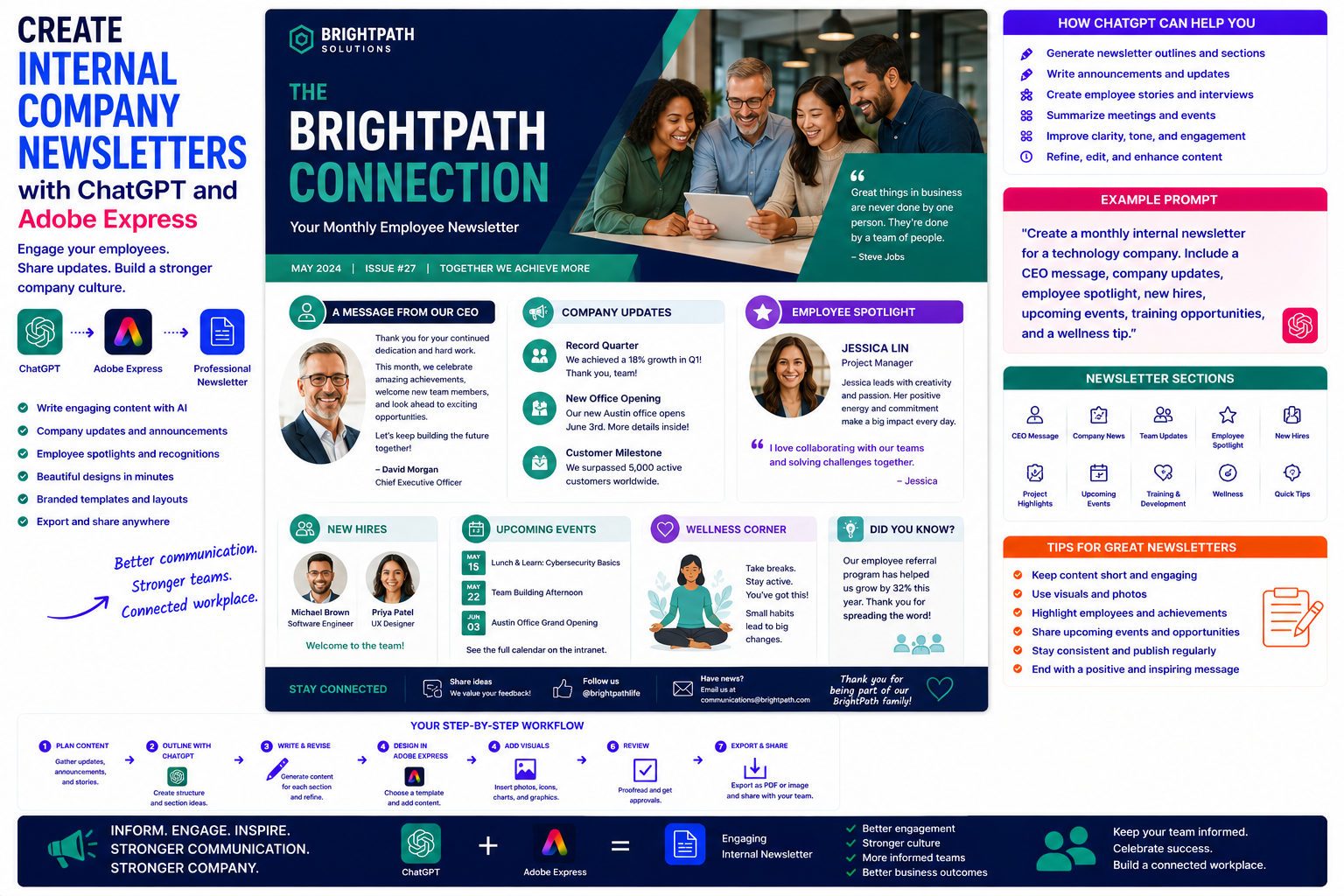
Keeping employees informed is one of the biggest challenges for growing organizations. Whether you’re announcing new projects, celebrating employee achievements, introducing policy changes, or sharing company news, internal newsletters help create a connected workforce.
Unfortunately, producing newsletters every month often requires significant time. HR teams and internal communications departments must collect updates, write articles, gather photos, design layouts, and publish everything on schedule.
By combining ChatGPT with Adobe Express, much of this work becomes dramatically easier. ChatGPT helps generate announcements, employee stories, leadership messages, and recurring content sections, while Adobe Express transforms that information into visually engaging newsletters employees actually enjoy reading.
In this guide, you’ll learn how to create professional internal newsletters using AI.
Why Use ChatGPT and Adobe Express?
Creating an employee newsletter traditionally involves:
- Collecting company updates
- Writing announcements
- Interviewing employees
- Editing articles
- Designing layouts
- Selecting photographs
- Applying branding
- Publishing digitally
ChatGPT and Adobe Express streamline every stage of this workflow.
Why Internal Newsletters Matter
Regular newsletters help organizations:
- Improve communication
- Increase employee engagement
- Strengthen company culture
- Recognize achievements
- Share business updates
- Introduce new employees
- Promote upcoming events
- Reduce misinformation
Consistent communication helps employees feel more connected to the organization.
What Can Your Newsletter Include?
Most internal newsletters feature recurring sections such as:
- CEO Message
- Company News
- Team Updates
- Employee Spotlight
- Project Highlights
- New Hires
- Work Anniversaries
- Training Opportunities
- Upcoming Events
- IT Tips
- Health & Wellness
- Community Activities
Using consistent sections makes newsletters easier to produce each month.
Step 1: Define Your Audience
Tell ChatGPT who the newsletter is for.
Example prompt:
Create a monthly employee newsletter for a technology company with approximately 300 employees working both remotely and in the office.
Or:
Write an internal newsletter for a manufacturing company with production, warehouse, and office staff.
Audience context improves relevance.
Step 2: Generate a Newsletter Structure
Ask ChatGPT:
Create a professional monthly employee newsletter template.
Typical sections include:
- Welcome
- Company Updates
- Leadership Message
- Employee Recognition
- Project Success Stories
- Upcoming Events
- Learning Opportunities
- Quick Tips
- Closing Message
A repeatable structure saves time every month.
Step 3: Generate Newsletter Content
ChatGPT can write:
- Company announcements
- CEO messages
- Department updates
- Employee interviews
- Success stories
- Event recaps
- Safety reminders
- IT security tips
Each section can be generated independently for easier editing.
Step 4: Create Employee Spotlights
Employee recognition improves engagement.
Example prompt:
Write a friendly employee spotlight introducing a new project manager who recently joined the company.
Include:
- Career background
- Personal interests
- Current role
- Fun facts
- Welcome message
Spotlights help employees get to know one another.
Step 5: Summarize Business Updates
Executives often need concise updates.
Ask ChatGPT:
Summarize this month’s executive meeting into five employee-friendly highlights.
Simple summaries make important information easier to digest.
Step 6: Design the Newsletter in Adobe Express
Once your content is ready, open Adobe Express.
Create a layout featuring:
- Cover page
- Welcome section
- News articles
- Spotlight pages
- Event calendar
- Photo gallery
- Closing page
Adobe Express provides professional newsletter templates that are easy to customize.
Step 7: Add Visual Elements
Adobe Express helps you include:
- Team photographs
- Office images
- Event photos
- Icons
- Infographics
- Department logos
- Milestone graphics
- Quote boxes
Visual content increases reader engagement.
Step 8: Apply Company Branding
Maintain consistency using:
- Company logo
- Brand colors
- Corporate fonts
- Header styles
- Footer information
- Consistent iconography
Strong branding reinforces your organizational identity.
Step 9: Publish and Share
Internal newsletters are commonly distributed through:
- Microsoft Teams
- SharePoint
- Company intranet
- PDF downloads
- HR platforms
- Learning Management Systems
Adobe Express exports high-quality PDFs and images suitable for digital distribution.
Example Prompt Library
Monthly Company Update
Create a monthly employee newsletter including executive updates, project milestones, new hires, work anniversaries, and upcoming events.
HR Newsletter
Write an HR newsletter covering benefits updates, wellness programs, training opportunities, and employee recognition.
IT Newsletter
Create an IT newsletter featuring cybersecurity tips, software updates, Microsoft 365 improvements, and upcoming maintenance schedules.
Manufacturing
Write an employee newsletter highlighting production milestones, safety achievements, quality improvements, and new equipment.
Remote Workforce
Create a newsletter for remote employees covering collaboration tips, virtual events, productivity advice, and company announcements.
Tips for Better Internal Newsletters
Professional internal newsletters usually:
- Keep articles concise.
- Celebrate employee achievements.
- Include leadership messages.
- Use high-quality photography.
- Promote upcoming events.
- Reinforce company culture.
- End with a positive message.
Employees are more likely to read newsletters that feel personal and visually engaging.
Common Mistakes
Avoid prompts such as:
Write an employee newsletter.
Instead write:
Create a monthly employee newsletter for a 500-person software company. Include a CEO message, product launch updates, employee spotlight, customer success story, cybersecurity tip, learning opportunities, upcoming events, and work anniversary recognitions. Use a friendly, professional tone.
Specific prompts consistently produce stronger newsletter content.
Best Workflow
Many communications teams follow this process:
- Collect company updates.
- Generate the newsletter structure with ChatGPT.
- Write each section individually.
- Create employee spotlights.
- Design the newsletter in Adobe Express.
- Add photography and branding.
- Review the content.
- Export and distribute.
This workflow helps organizations publish high-quality newsletters consistently while reducing preparation time.
Who Should Use This Workflow?
This workflow is ideal for:
- HR departments
- Internal communications teams
- Company leadership
- Operations managers
- Non-profit organizations
- Educational institutions
- Government agencies
- Manufacturing companies
- Healthcare organizations
- Growing businesses
Any organization communicating regularly with employees can benefit from AI-assisted newsletter creation.
Why This Workflow Works
ChatGPT helps organize company information before you begin designing.
By the time you open Adobe Express, you’ll already have:
- Company announcements
- Employee stories
- Leadership messages
- Newsletter sections
- A consistent editorial structure
Adobe Express then transforms that content into an attractive newsletter that employees are more likely to read and enjoy.
Conclusion
Creating internal company newsletters with ChatGPT and Adobe Express combines AI-powered writing with professional design tools. ChatGPT helps generate engaging employee communications, summarize business updates, and organize recurring content, while Adobe Express provides polished layouts, branding features, and visual elements that make newsletters informative and enjoyable to read.
Whether you’re improving employee engagement, strengthening company culture, or sharing important organizational updates, this AI-powered workflow helps you produce professional internal newsletters faster while maintaining a consistent brand identity.
Frequently Asked Questions
Can ChatGPT write internal newsletters?
Yes. ChatGPT can generate company announcements, leadership messages, employee spotlights, department updates, and recurring newsletter sections. Review the content to ensure it accurately reflects your organization’s news and tone.
Can Adobe Express design company newsletters?
Yes. Adobe Express offers newsletter templates and document design tools suitable for employee communications, HR updates, and internal announcements.
How often should internal newsletters be published?
Most organizations publish internal newsletters monthly, though some prefer weekly or quarterly editions depending on the amount of company news and the size of the organization.
What is the best way to distribute an internal newsletter?
PDF and email are common options, but many organizations also share newsletters through Microsoft Teams, SharePoint, intranets, and employee portals.
Related Articles
- Create Company Policy Documents with ChatGPT and Adobe Express
- Create Employee Handbooks with ChatGPT and Adobe Express
- Create Standard Operating Procedures (SOPs) with ChatGPT and Adobe Express
- Create Training Manuals with ChatGPT and Adobe Express
- Best ChatGPT Prompts for Adobe Express






