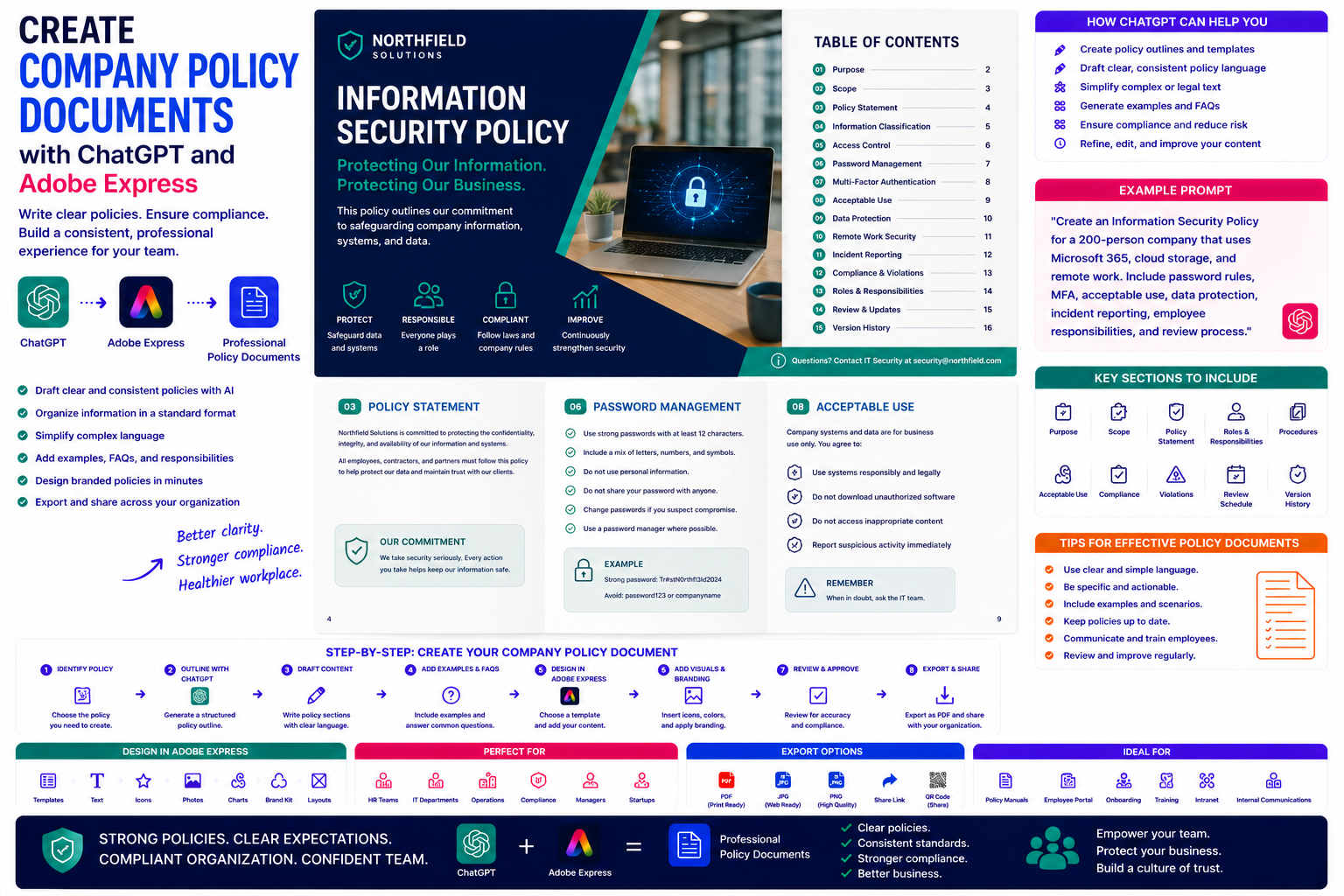
Every organization relies on policies to establish consistent expectations, reduce risk, and ensure employees understand how the business operates. From remote work guidelines and cybersecurity rules to leave policies and workplace conduct, well-written company policies provide clarity for both employees and management.
Unfortunately, creating policy documents can be time-consuming. Policies must be clearly written, legally reviewed, consistently formatted, and easy for employees to understand.
By combining ChatGPT with Adobe Express, organizations can dramatically accelerate policy creation. ChatGPT helps organize topics, generate policy drafts, simplify legal language, and maintain consistency, while Adobe Express turns those documents into polished publications that reflect your company’s visual identity.
In this guide, you’ll learn how to create professional company policy documents using AI.
Why Use ChatGPT and Adobe Express?
Creating policy documents traditionally requires:
- Researching regulations
- Drafting policies
- Organizing sections
- Standardizing language
- Designing layouts
- Applying branding
- Publishing documentation
- Updating future revisions
ChatGPT speeds up the writing process while Adobe Express improves presentation and usability.
What Are Company Policy Documents?
Company policies explain how employees are expected to work within an organization.
Policies commonly cover:
- Workplace conduct
- Attendance
- Working hours
- Remote work
- Information security
- Acceptable use of technology
- Privacy
- Social media
- Health and safety
- Anti-harassment
- Diversity and inclusion
- Expense reimbursement
These documents help create consistency across the organization.
Why Policies Matter
Well-written policies help organizations:
- Reduce misunderstandings
- Improve compliance
- Standardize procedures
- Protect employees
- Reduce legal risk
- Support managers
- Improve onboarding
- Build organizational trust
Policies also make decision-making more consistent.
Step 1: Identify the Policy
Start by telling ChatGPT which policy you want to create.
Example prompt:
Create a Remote Work Policy for a software company with employees working in multiple countries.
Or:
Write an Information Security Policy for an organization using Microsoft 365 and cloud services.
Being specific leads to stronger results.
Step 2: Generate a Standard Structure
Ask ChatGPT to create a reusable template.
Example prompt:
Create a professional company policy template.
Typical sections include:
- Purpose
- Scope
- Policy Statement
- Responsibilities
- Procedures
- Exceptions
- Compliance
- Review Schedule
- Version History
Using a standard format makes future policies easier to maintain.
Step 3: Draft the Policy
ChatGPT can write:
- Policy statements
- Responsibilities
- Employee expectations
- Management responsibilities
- Compliance guidance
- Definitions
- Examples
- Frequently Asked Questions
Always review the draft to ensure it aligns with your organization’s practices and applicable laws.
Step 4: Simplify Complex Language
Many policy documents contain technical or legal terminology.
Ask ChatGPT:
Rewrite this policy in clear language suitable for all employees.
Simple language improves understanding and encourages compliance.
Step 5: Add Practical Examples
Employees often learn better through examples.
Include scenarios such as:
- Appropriate remote work behavior
- Password management examples
- Social media do’s and don’ts
- Expense claim examples
- Acceptable device usage
Examples help employees understand how policies apply in real situations.
Step 6: Design the Policy Document in Adobe Express
Once the content is complete, open Adobe Express.
Design a professional document featuring:
- Cover page
- Table of contents
- Policy chapters
- Icons
- Callout boxes
- FAQ section
- Revision history
Adobe Express creates documents that are attractive and easy to read.
Step 7: Add Visual Elements
Visual design improves readability.
Adobe Express lets you include:
- Icons
- Process diagrams
- Decision trees
- Flowcharts
- Warning notices
- Checklists
- Section dividers
- Company photography
Visual elements make policies less intimidating and easier to navigate.
Step 8: Apply Corporate Branding
Customize the document using:
- Company logo
- Brand colors
- Corporate typography
- Headers
- Footers
- Version numbers
- Document references
Professional branding reinforces consistency across internal documentation.
Step 9: Export and Distribute
Policy documents are commonly distributed through:
- Employee portals
- SharePoint
- HR systems
- Learning Management Systems
- PDF downloads
- Printed manuals
Adobe Express exports professional PDFs suitable for digital and printed distribution.
Example Prompt Library
Remote Work Policy
Create a remote work policy explaining eligibility, equipment, cybersecurity, communication expectations, and working hours.
Information Security Policy
Write an information security policy covering passwords, MFA, phishing awareness, acceptable device usage, and data protection.
Social Media Policy
Create a company policy explaining responsible social media usage for employees both inside and outside the workplace.
Leave Policy
Develop a leave policy covering vacation, sick leave, parental leave, and leave approval procedures.
Acceptable Use Policy
Write an acceptable use policy explaining proper use of company computers, software, email, and internet resources.
Tips for Better Company Policies
Professional policies usually:
- Define a clear purpose.
- Use simple language.
- Explain responsibilities.
- Include practical examples.
- Follow a consistent format.
- Track revision history.
- Be reviewed regularly.
Employees are more likely to follow policies they understand.
Common Mistakes
Avoid prompts such as:
Write a company policy.
Instead write:
Create a professional Information Security Policy for a 300-employee consulting company using Microsoft 365, cloud storage, and remote work. Include password requirements, MFA, acceptable use, phishing prevention, incident reporting, employee responsibilities, compliance requirements, and an annual review process. Use clear language suitable for all employees.
Detailed prompts consistently produce stronger documentation.
Best Workflow
Many HR and operations teams follow this process:
- Identify the required policy.
- Generate a structured outline with ChatGPT.
- Draft each section.
- Simplify the language.
- Add examples and FAQs.
- Design the document in Adobe Express.
- Apply company branding.
- Export and distribute.
This workflow creates consistent documentation while reducing policy development time.
Who Should Use This Workflow?
This workflow is ideal for:
- HR departments
- Business owners
- Operations managers
- IT departments
- Compliance teams
- Healthcare organizations
- Educational institutions
- Government agencies
- Manufacturing companies
- Growing startups
Every organization benefits from professionally documented workplace policies.
Why This Workflow Works
ChatGPT helps organize policy information before you focus on presentation.
By the time you open Adobe Express, you’ll already have:
- A complete policy structure
- Employee-friendly language
- Standardized formatting
- Practical examples
- Frequently asked questions
Adobe Express then transforms that content into professional documentation that employees are more likely to read and understand.
Conclusion
Creating company policy documents with ChatGPT and Adobe Express combines AI-powered writing with professional document design. ChatGPT helps draft consistent policies, simplify complex information, and organize workplace guidance, while Adobe Express provides polished layouts, branding tools, and visual elements that improve readability and professionalism.
Whether you’re documenting HR policies, IT security rules, workplace conduct, or operational guidelines, this AI-powered workflow helps you produce professional policy documents more efficiently while maintaining consistency throughout your organization.
Frequently Asked Questions
Can ChatGPT write company policies?
Yes. ChatGPT can help create policy outlines, draft policy statements, generate examples, and simplify technical language. You should always review the content to ensure it reflects your organization’s requirements and complies with applicable laws and regulations.
Can Adobe Express design policy documents?
Yes. Adobe Express offers document templates and design tools that work well for policy manuals, HR documentation, employee guides, and internal communications.
Should company policies include examples?
Yes. Practical examples help employees understand how policies apply in everyday situations and can improve compliance.
What is the best format for distributing company policies?
PDF is the most common format because it preserves formatting, is easy to distribute through employee portals and HR systems, and is suitable for professional printing.
Related Articles
- Create Employee Handbooks with ChatGPT and Adobe Express
- Create Standard Operating Procedures (SOPs) with ChatGPT and Adobe Express
- Create Training Manuals with ChatGPT and Adobe Express
- Create Sales Proposals with ChatGPT and Adobe Express
- Best ChatGPT Prompts for Adobe Express






