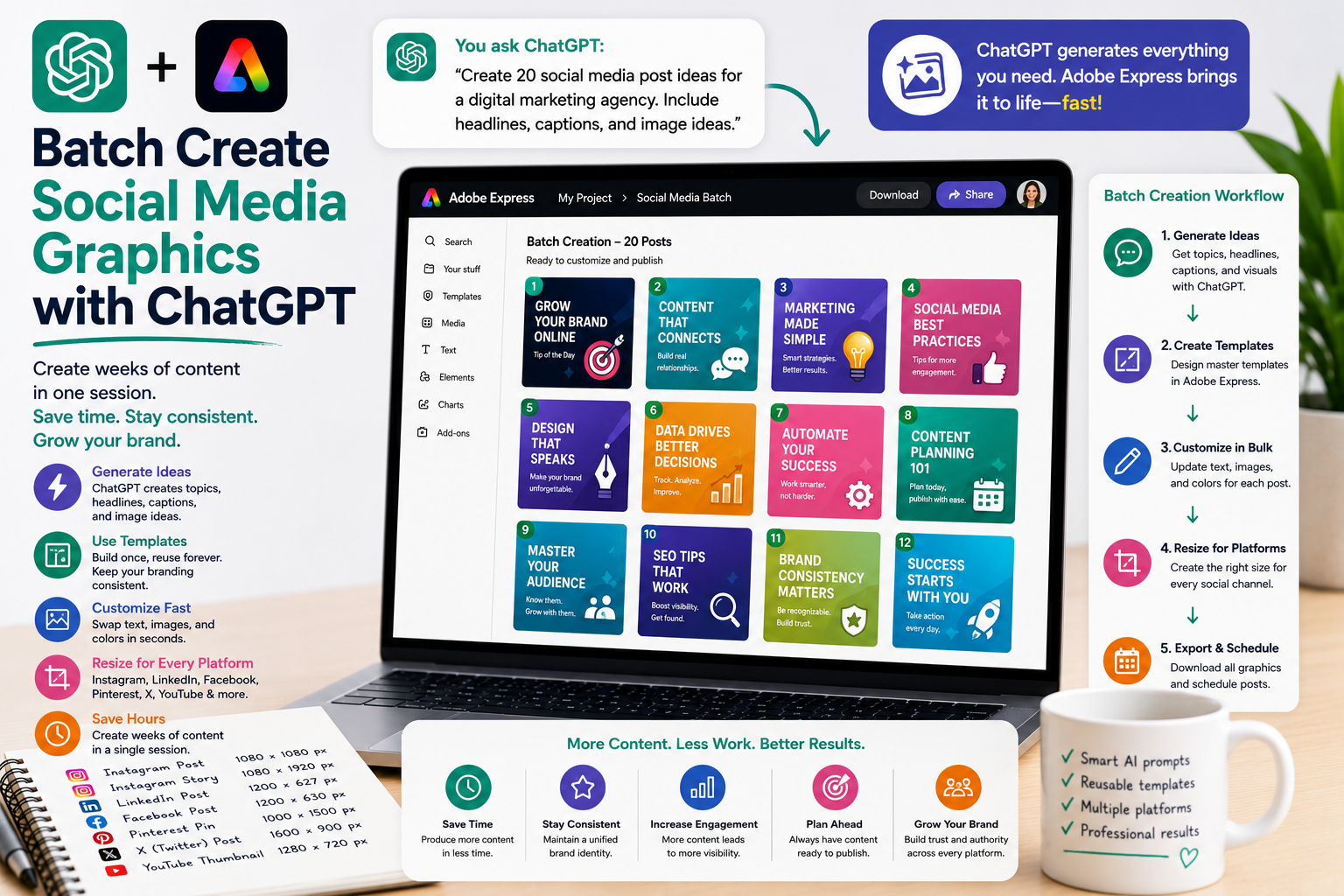
Creating social media content one graphic at a time can quickly become overwhelming. Businesses often need dozens of posts every month for multiple platforms, campaigns, products, and promotions. Designing each graphic individually is repetitive and takes valuable time away from strategy and content creation.
By combining ChatGPT with Adobe Express, you can batch create social media graphics much more efficiently. ChatGPT helps generate ideas, headlines, captions, image suggestions, and design variations, while Adobe Express makes it easy to turn those ideas into professional graphics at scale.
In this guide, you’ll learn how to streamline your entire social media design workflow using AI.
What Is Batch Content Creation?
Batch creation means producing multiple pieces of content during a single work session.
Instead of creating one graphic today and another tomorrow, you create an entire week’s—or even a month’s—worth of social media graphics at once.
This approach improves consistency while reducing repetitive work.
Why Batch Create Graphics?
Creating multiple graphics together offers several advantages:
- Save hours every week
- Maintain consistent branding
- Publish more frequently
- Reduce creative fatigue
- Plan campaigns more effectively
- Improve workflow efficiency
- Stay ahead of your content calendar
Many successful marketers work in batches because it allows them to focus on planning rather than constantly switching between tasks.
Start with a Content Plan
Before opening Adobe Express, ask ChatGPT to generate your content ideas.
Example prompts:
Create 30 social media post ideas for a digital marketing agency.
Generate one month of LinkedIn content.
Create 20 Instagram post ideas for a software company.
Suggest weekly educational graphics for my business.
Having all your ideas ready makes the design process much faster.
Generate Headlines
Once your topics are ready, ChatGPT can create engaging headlines.
Examples:
Write 20 short social media headlines.
Create attention-grabbing LinkedIn titles.
Generate motivational quotes for Instagram.
Write educational post titles about Adobe Express.
Instead of brainstorming each post individually, you receive a complete collection in minutes.
Create Supporting Copy
After generating headlines, ask ChatGPT to produce:
- Short captions
- Calls-to-action
- Hashtags
- Bullet points
- Statistics
- Quotes
- Tips
- Customer questions
These content blocks can be reused across multiple designs.
Build Reusable Templates
Adobe Express templates make batch production even faster.
Create templates for:
- Quote graphics
- Tips
- Product promotions
- Case studies
- Announcements
- Events
- Testimonials
- Blog promotions
Once the template is complete, simply replace the content for each new graphic.
Generate Image Ideas
ChatGPT can also suggest visuals for every post.
Examples:
Suggest images for 20 productivity tips.
Recommend illustrations for AI tutorials.
Create image concepts for marketing campaigns.
Suggest icons for educational graphics.
This reduces the time spent searching for suitable visuals.
Produce Multiple Design Variations
You don’t need every graphic to look identical.
Ask ChatGPT:
Create three design styles for this campaign.
Or:
Alternate between dark and light themes.
Or:
Create modern, minimalist, and colorful versions.
This keeps your content visually fresh while maintaining brand consistency.
Prepare Graphics for Multiple Platforms
Each design can be adapted for:
- X
- YouTube
- Stories
- Reels covers
Rather than redesigning every graphic, simply resize and reposition elements where necessary.
Example Workflow
A productive batch creation session might look like this:
- Generate 30 post ideas with ChatGPT.
- Write headlines and captions.
- Create image suggestions.
- Open Adobe Express.
- Apply your Brand Kit.
- Duplicate your template.
- Replace the text and visuals.
- Resize for each platform.
- Export the complete batch.
By the end of one session, you could have dozens of graphics ready to publish.
Example Prompts
Here are some prompts you can reuse:
- Generate 30 LinkedIn post ideas.
- Create one month of Instagram graphics.
- Write headlines for a marketing campaign.
- Suggest images for AI content.
- Create weekly educational graphics.
- Generate five promotional designs for a product launch.
- Produce quote graphics for business leaders.
- Create social graphics for blog articles.
- Build a month’s worth of Pinterest Pins.
- Generate multiple design styles for the same campaign.
Best Practices
For the best results:
- Create a monthly content calendar.
- Use consistent templates.
- Apply your Brand Kit.
- Group similar content together.
- Review every graphic before exporting.
- Save reusable design components.
- Organize projects by campaign.
Consistency is one of the biggest advantages of batch creation.
Common Mistakes to Avoid
Avoid these common problems:
- Making every graphic identical.
- Publishing without reviewing text.
- Using inconsistent branding.
- Ignoring platform-specific dimensions.
- Creating too many unrelated styles.
- Forgetting to update calls-to-action.
A consistent visual identity builds recognition and trust.
Conclusion
Batch creating social media graphics is one of the most effective ways to improve your content production workflow. By combining ChatGPT with Adobe Express, you can generate ideas, write copy, plan visuals, and produce dozens of professional graphics in a single session.
Whether you’re managing a business, marketing agency, educational brand, or personal account, AI-powered batch creation helps you publish more consistently, save valuable time, and maintain high-quality visual content across every social platform.
Related Articles
- Resize Graphics for Every Social Platform
- Create Multiple Design Variations Automatically
- How ChatGPT Automatically Finds Adobe Express Templates
- Using Natural Language to Edit Adobe Express Designs
- Create Instagram Posts with ChatGPT and Adobe Express
- Create LinkedIn Graphics with ChatGPT and Adobe Express
- Create Pinterest Pins with ChatGPT and Adobe Express






