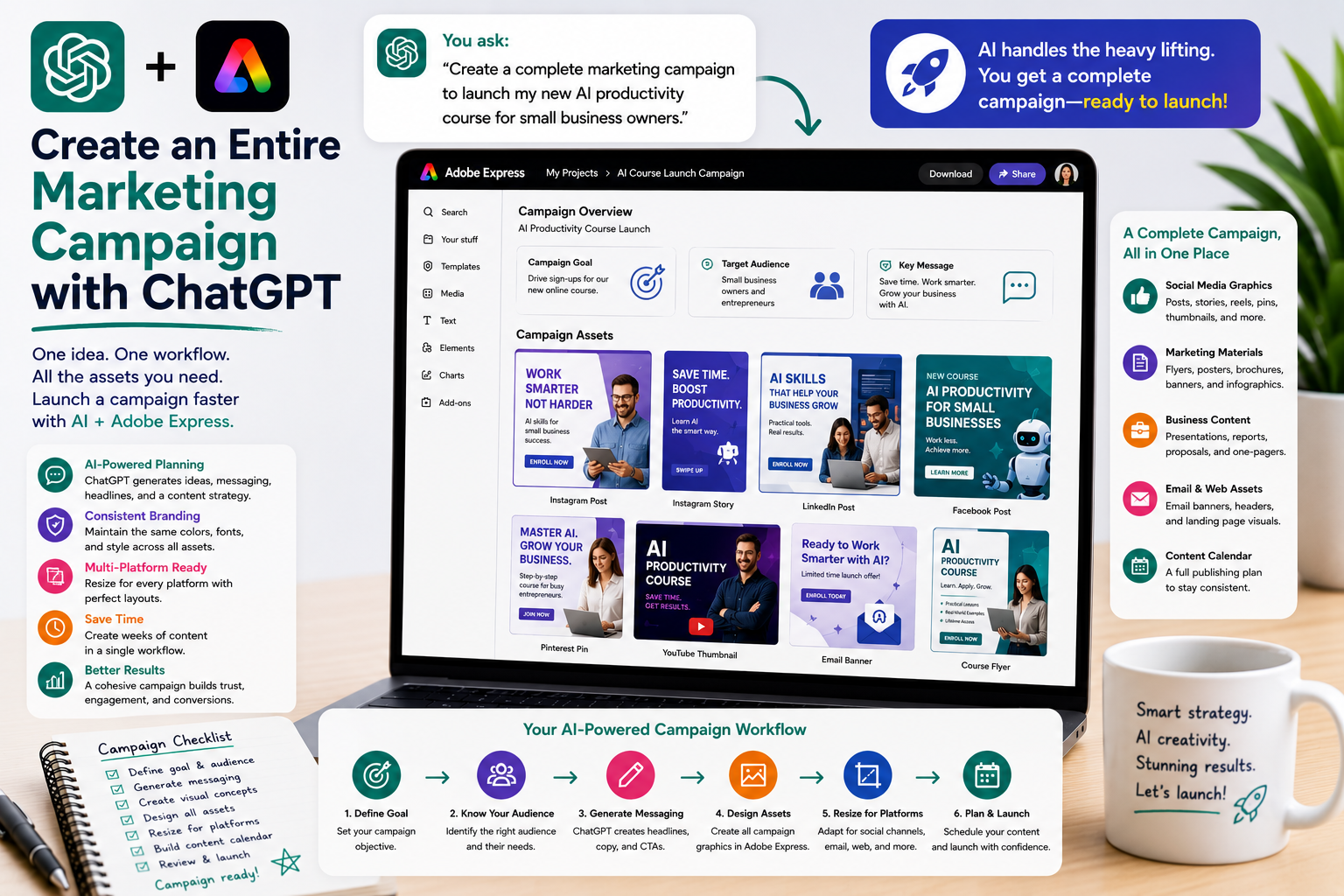
Launching a successful marketing campaign involves much more than designing a single graphic. You need a compelling message, consistent branding, eye-catching visuals, social media posts, email promotions, presentations, landing page assets, and advertising materials—all working together to achieve the same objective.
Traditionally, creating a complete campaign required multiple tools and many hours of manual work. By combining ChatGPT with Adobe Express, you can dramatically accelerate the entire process. ChatGPT helps generate ideas, messaging, and content, while Adobe Express transforms those ideas into professional marketing assets.
In this guide, you’ll learn how AI can help you plan, design, and launch an entire marketing campaign from a single prompt.
Why Build Campaigns with AI?
Modern campaigns often include dozens of assets.
These may include:
- Social media graphics
- Display advertisements
- Email banners
- Blog graphics
- Presentations
- Flyers
- Brochures
- Posters
- Landing page images
- Product announcements
AI helps create these assets faster while keeping the campaign visually consistent.
Start with Your Campaign Goal
Every successful campaign begins with a clear objective.
Examples include:
- Launch a new product
- Promote a webinar
- Generate leads
- Increase website traffic
- Announce an event
- Drive sales
- Build brand awareness
- Recruit employees
Describe your goal to ChatGPT before creating any designs.
Example prompt:
Create a marketing campaign for launching a new AI productivity course aimed at small business owners.
Define Your Target Audience
Your messaging should match your audience.
Ask ChatGPT:
Create campaign messaging for startup founders.
Or:
Develop marketing content for HR professionals.
Or:
Write promotional copy for university students.
Different audiences respond to different language, visuals, and calls-to-action.
Generate Campaign Messaging
Once your audience is defined, let ChatGPT create:
- Headlines
- Taglines
- Value propositions
- Calls-to-action
- Promotional copy
- Feature lists
- Customer benefits
- Frequently asked questions
These become the foundation of every design you’ll create in Adobe Express.
Create Visual Concepts
ChatGPT can also help plan the visual direction.
Example prompts:
Suggest image concepts for a cybersecurity campaign.
Recommend color palettes for a healthcare product.
Create a premium visual style for a luxury brand.
Design a playful campaign for educational software.
These ideas help ensure every asset shares a consistent look and feel.
Build Campaign Assets
Adobe Express makes it easy to transform your campaign ideas into professional designs.
Typical assets include:
Social Media
- Instagram posts
- LinkedIn graphics
- Facebook posts
- Pinterest Pins
- Stories
- Reels covers
Marketing Materials
- Flyers
- Posters
- Brochures
- Banners
- Infographics
- Product sheets
Business Content
- Presentations
- Sales proposals
- One-page summaries
- Case studies
- Executive reports
A single campaign can produce dozens of coordinated assets.
Create Platform Variations
Not every platform requires the same design.
Ask ChatGPT:
Adapt this campaign for LinkedIn.
Create a more colorful Instagram version.
Design a vertical Pinterest graphic.
Build a YouTube thumbnail.
Create an email banner.
Adobe Express allows you to quickly resize and customize each variation.
Maintain Brand Consistency
A successful campaign should feel unified.
Use prompts like:
Keep the same typography across every asset.
Use our blue and white corporate branding.
Maintain the same visual style throughout the campaign.
Create a consistent professional appearance.
Consistency improves brand recognition and trust.
Build a Complete Content Calendar
After creating your assets, ask ChatGPT to organize them.
Example:
Create a 30-day publishing schedule using these campaign graphics.
Or:
Plan a two-week product launch across LinkedIn, Instagram, Facebook, and Pinterest.
This transforms individual graphics into a structured campaign.
Example Workflow
A complete AI-assisted campaign might follow these steps:
- Define the campaign goal.
- Identify the target audience.
- Generate messaging with ChatGPT.
- Create image concepts.
- Design assets in Adobe Express.
- Resize graphics for every platform.
- Build supporting marketing materials.
- Create a publishing calendar.
- Review and export all assets.
- Launch the campaign.
This workflow can replace days of manual planning.
Example Prompts
Here are several prompts you can reuse:
- Create a complete product launch campaign.
- Build a marketing campaign for a webinar.
- Generate promotional materials for an online course.
- Create a seasonal sales campaign.
- Design a recruiting campaign.
- Build a social media campaign for a new software product.
- Create an event promotion campaign.
- Generate graphics for a nonprofit fundraising campaign.
- Develop a customer appreciation campaign.
- Create a campaign for a business conference.
Best Practices
To build stronger campaigns:
- Start with a clear objective.
- Define one primary audience.
- Use consistent branding.
- Reuse templates where possible.
- Create platform-specific versions.
- Schedule content in advance.
- Review every asset before publishing.
A well-organized campaign delivers a stronger message across every channel.
Common Mistakes to Avoid
Avoid these common campaign errors:
- Creating inconsistent branding.
- Changing messaging between platforms.
- Using different visual styles.
- Ignoring audience preferences.
- Publishing without a content schedule.
- Forgetting clear calls-to-action.
Every asset should support the same campaign goal.
Conclusion
Creating an entire marketing campaign no longer requires weeks of planning or a large creative team. By combining ChatGPT with Adobe Express, you can generate campaign ideas, messaging, graphics, presentations, promotional materials, and publishing plans from a single workflow.
Whether you’re launching a product, promoting an event, generating leads, or building brand awareness, AI helps you produce cohesive, professional marketing campaigns faster than ever before.
Related Articles
- Batch Create Social Media Graphics with ChatGPT
- Resize Graphics for Every Social Platform
- Create Multiple Design Variations Automatically
- Create Marketing Materials with ChatGPT and Adobe Express
- Create Executive Dashboards with ChatGPT and Adobe Express
- Create LinkedIn Graphics with ChatGPT and Adobe Express
- Create Instagram Posts with ChatGPT and Adobe Express






